De release-opmerkingen zijn in het Engels geschreven.
Closed pages let go, sites stay apart, and fonts stop costing memory
A memory and safety release. Reading one article after another no longer piles up memory: a page you leave is now actually freed, where each one used to stay behind at about 45 MB. One site can no longer leave its code on the next site's iterators, a gap in how pages are kept apart. Installed fonts are read straight from their files instead of being copied into memory, so Floati starts in half the memory and every page is lighter. The Windows crash when switching quickly between heavy tabs is fixed at its cause, so Floati gives unused memory back to the system again. Tested on a Mac and on Windows.
Pages you leave are freed
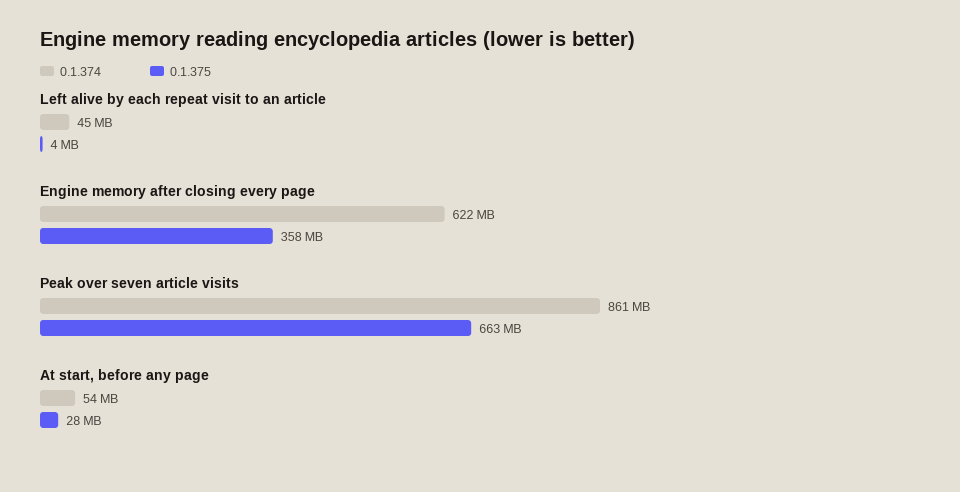
Floati's JavaScript engine remembers, at each call in a hot function, which function was called there last, so the next call can go straight to it. That memory held on to the called function itself, and through it everything the page had built: when you closed an article, the engine kept it, and every article you read added about 45 MB that never came back. The engine now remembers only where the function lives, which is all its checks need, so the address cannot be handed to anything else while it is remembered, and the page itself can go. Reading the same article again now leaves 0 to 11 MB behind instead of 41 to 52. Over seven article visits the engine's peak memory fell from 861 to 663 MB, and with every page closed from 622 to 358 MB. Floati's test gate now fails any change that lets a closed page linger like this again. Finding it took new instruments: the engine can now say, for a closed page, exactly which object is still holding it and how much that object keeps alive.
One site cannot leave code on the next
Every page gets its own copy of JavaScript's built-in objects, so what one site changes cannot reach another. The prototype behind every iterator (what a loop over an array, a Map or a generator uses) was the exception: Floati made it once and shared it with every page. Many sites ship a library that adds its own helper functions to exactly that object, so those helpers stayed on it after you left the site and showed up on the next site's iterators. That is a gap in how pages are kept apart, and it also kept the first site alive in memory. Each page now gets its own iterator prototypes, thrown away with the page. Two new permanent tests prove it: one checks that a helper one page adds is invisible to the next, the other that a page which adds one is still freed.
Fonts read from their files, not copied into memory
To draw text, Floati uses the fonts installed on your computer, and the ones every page needs (the system sans, mono, serif and a font for Chinese, Japanese and Korean) are tens of megabytes. They were read into Floati's own memory and stayed there for as long as it ran. Now they are mapped: Floati reads them straight from the font files, the way the system itself does, so their pages are shared with every other app using the same fonts and the system can drop and reread them when memory is tight. Floati also finds an already-loaded font by where it lives instead of comparing its megabytes again. The engine starts in 28 MB instead of 54, and every page is 35 to 48 MB lighter while it is open.
Windows: the fast tab-switch crash, fixed at its cause
Switching quickly between heavy tabs could crash Floati on Windows. 0.1.373 stopped the crash by turning off a feature that gives the unused parts of half-empty memory pages back to the system, at the cost of memory. The real cause is now found and fixed: when such a page emptied completely, its memory could be handed back while Floati was still reading through it. A Mac reads that memory as zeros and carries on, which is why it only crashed on Windows. Floati can now reproduce the Windows behaviour on a Mac, a permanent test crashes the old way, and the fix passes it. With the feature back on, Floati on Windows went through 30 rounds of fast switching across 14 tabs, including a code-hosting site and a documentation site, with no crash and no memory creep.
Wat er veranderd is
9 wijzigingen- Geheugen en lezenA closed page is freed: the JavaScript engine's call caches no longer keep the page's functions alive (repeat visits to an article leave about 4 MB instead of 45).
- Geheugen en lezenThe test gate fails any change that lets a closed page stay in memory.
- Geheugen en lezenNew engine diagnostics name what keeps a closed page alive and how much it holds.
- Privacy en ShieldsIterator prototypes belong to their page: one site's helpers never reach the next site's iterators.
- Geheugen en lezenInstalled fonts are mapped from their files instead of copied into memory (engine starts in 28 MB instead of 54; pages 35-48 MB lighter).
- WeergaveAn already-loaded font is found by where it lives, without comparing its bytes again.
- NetwerkWindows: switching quickly between heavy tabs no longer crashes, now fixed at its cause.
- Geheugen en lezenUnused parts of memory pages are given back to the system again.
- Geheugen en lezenKnown: some large web apps still stay in memory after you close them; the engine now shows exactly which object holds them, and the fix is next.


