Las notas de versión están escritas en inglés.
Pages laid out the way their authors wrote them, and less memory again
A page-drawing release with more memory saved. Comparing Floati's picture of a page with the reference browser's, pixel by pixel, on a set of well-known sites showed where Floati laid pages out wrongly, and fourteen of those mistakes are fixed: which style rule wins when two disagree, how a line break, a grid, a flexible row and a font size written as a sum behave, where a line of text sits, and more. A design framework's documentation page went from 26 percent of its pixels different to 5, a news front page from 35 to 20. On memory, the same 33 randomly picked popular sites now use 4,301 MB in Floati against 10,377 MB in the reference browser on the same Mac (59 percent less; 0.1.378 used 4,524), the average site settles at 130 MB, and Floati uses less than the reference browser on 29 of the 33. Pictures nobody can see, because they are fully transparent or hidden, now give back their memory, and pictures on sharp screens are kept at exactly the pixels they are drawn at. Measured and tested on a Mac; the Windows build passes the same engine tests.
Pages look the way they were written
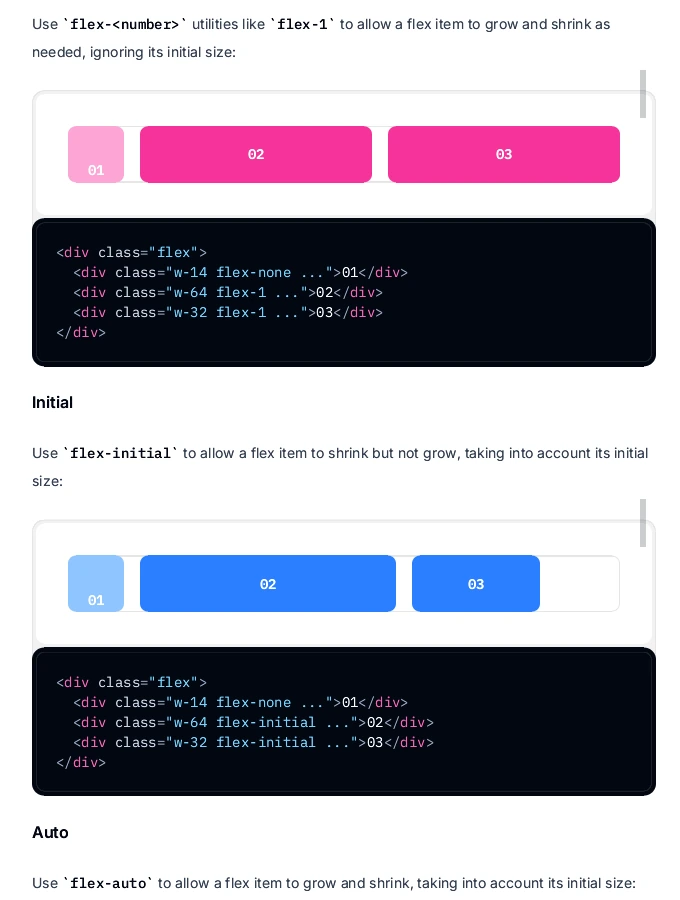
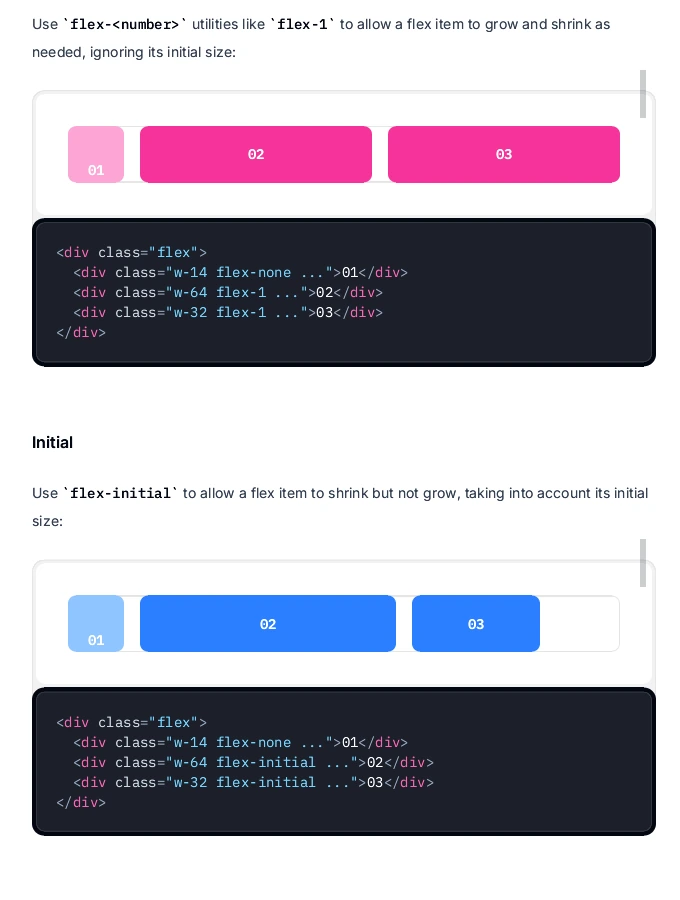
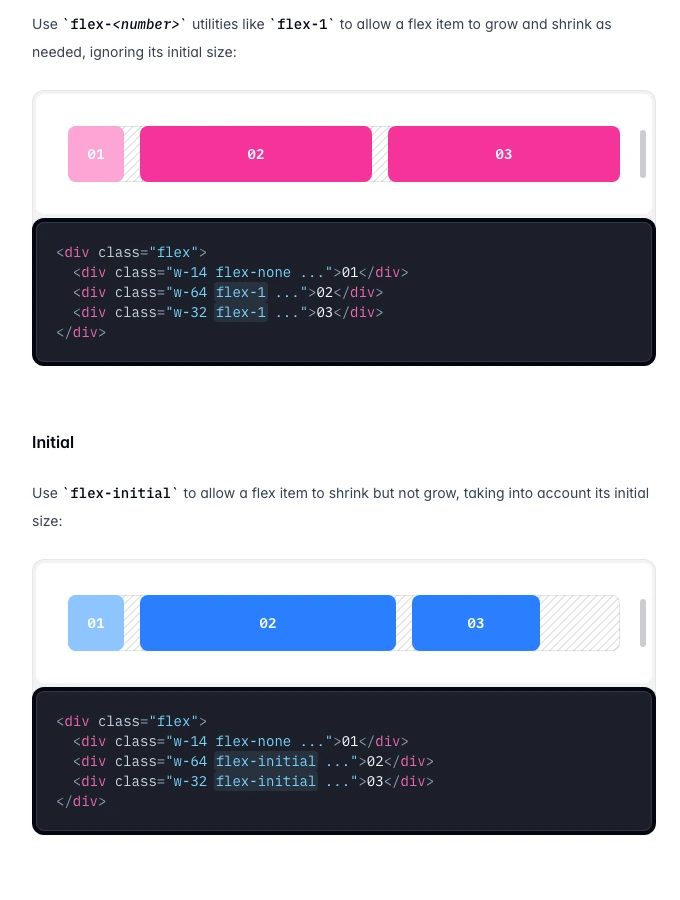
To find layout mistakes we draw well-known pages in Floati and in the reference browser and compare them pixel by pixel, then shrink each difference down to a few lines of page code and check that rule against the reference. Fourteen fixes came out of it. When a site's style sheet marks a rule as important it now beats a style written on the element itself, as the standard says; it used to lose, so menus and buttons sat in the wrong place. Rules written with the newer selector forms (is, where, not, has) now weigh exactly as much as they should, so the right one wins. A line break at the end of a line no longer starts an empty extra line. A font size written as a sum (a calc) is worked out once, so everything inside inherits the size and not the formula. A line height written in em or percent is fixed where it is written, so text inside a bigger heading does not grow its own gaps. Grids now share the height of a tall item among the rows it spans the way the reference does and understand rows named by the page, flexible rows stretch their items to the exact height the page set, an overlay over a picture covers the whole picture, labels meant only for screen readers no longer push the header down, and a button with a two-line label lines up with its neighbours. Every fix has a test that fails without it.
A design framework's documentation page: Floati 0.1.378, Floati 0.1.379 and the reference browser. The gaps under each example now match, so every heading below sits where the page puts it.
Less memory on the same random sites
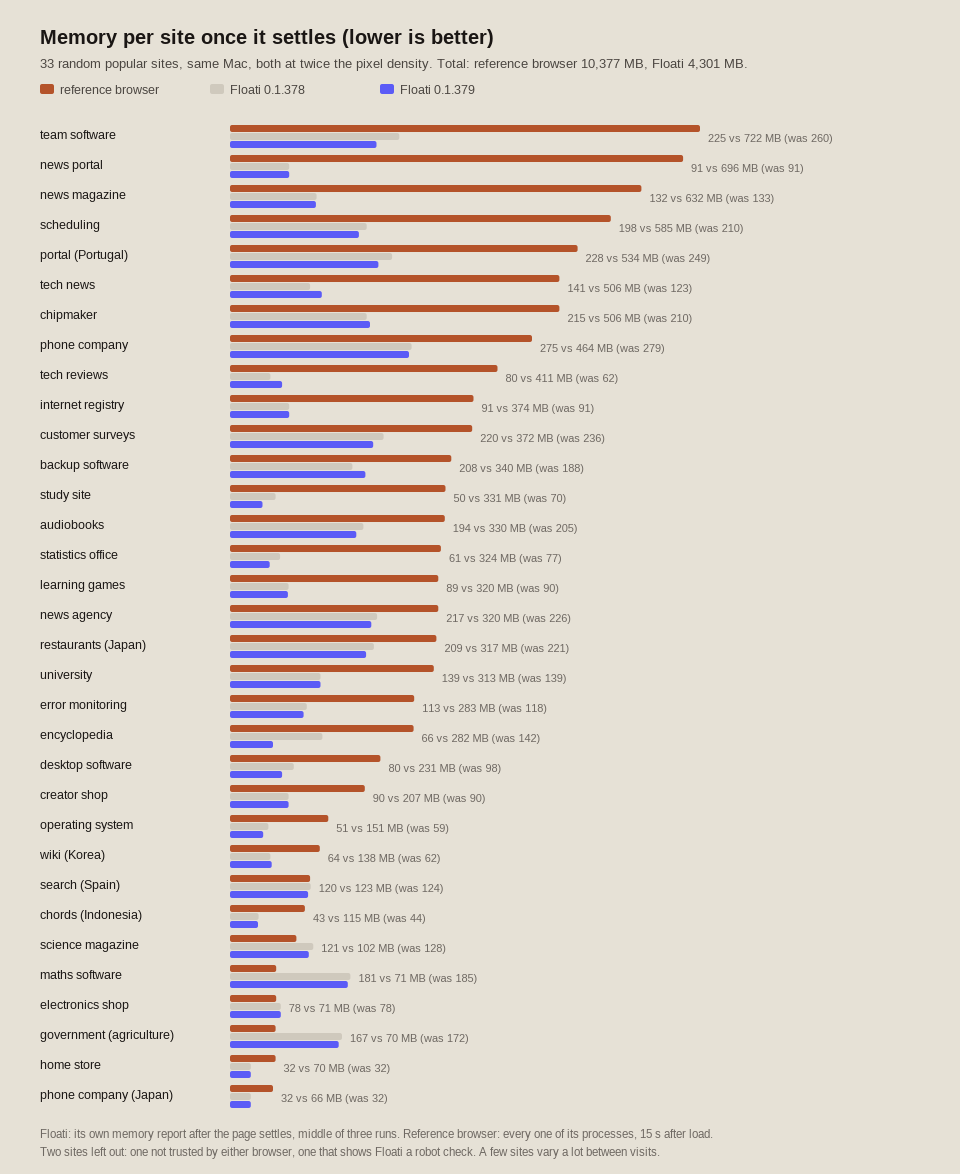
The same 33 sites as in the last two releases, picked at random from a public list of the most visited websites, opened in Floati on the same Mac at twice the pixel density, three times each (the middle result is shown). Floati used 4,301 MB in total, against 10,377 MB for the reference browser and 4,524 MB for 0.1.378, and less than the reference browser on 29 of the 33. Three changes did most of it. A picture that is fully transparent or hidden (the resting slides of a fading slideshow, for example) is not drawn, so it now gives its memory back like a picture far down the page, and takes it again the moment it shows. On a sharp screen a picture is kept at exactly the pixels it is drawn at, where Floati used to keep a quarter more in case the box grew, and background pictures are kept at the size they are painted, not their full file size. And each picture keeps only one form: the compressed file or the drawn pixels, whichever it needs, never both. An encyclopedia went from 142 to 66 MB, a study site from 70 to 50, a team software site from 260 to 225. Four sites still use more than the reference browser: a maths software site, a government site, a science magazine and a shop, mostly because of large pictures and the compiled code of scripts that never run.
Qué cambió
22 cambios- RenderizadoAn !important rule in a style sheet now beats a style written directly on the element, the order the standard sets (normal rules, then the element's own style, then important rules). A page that forces a margin with !important now gets it.
- RenderizadoA scrolling panel inside a column of fixed height keeps the height the column gives it and scrolls its own content, instead of growing to fit everything and spilling over the panel below.
- API web y DOMSelector weights follow the newest standard: :where() adds nothing, while :is(), :not() and :has() weigh as much as their strongest part. A CSS framework's 'weakest' typography rules no longer beat stronger ones, so its documentation headings get the right spacing (pixel difference from the reference 26 -> 17 percent).
- RenderizadoA line break (<br>) ends the line it sits on: one at the end of a line no longer opens an extra empty line, and one at the start breaks before what follows. Code blocks that end every line with a break were drawn twice as tall.
- RenderizadoA font size written as a formula (calc(), such as 'one em minus 20 percent') is worked out once where it is written, so nested elements inherit the result instead of shrinking the text again at every level. A docs site's live code editor drew its code as faint dashes 4 pixels tall; it is 13.6 pixels now, as in the reference.
- RenderizadoA line height written in em, percent or rem is turned into pixels where it is declared and passed down as pixels, so a large heading inside a smaller block no longer gets a line nearly twice too tall. Plain numbers still pass down as numbers, as the standard says.
- RenderizadoA flexible row with a set height stretches its items to exactly that height; taller content now overflows instead of making the row taller (a news site's 32 pixel logo row had become 36).
- RenderizadoAn inline block whose text sits inside nested boxes lines up on that text's baseline, so navigation bars and story lists built that way are no longer taller than they should be (one list was 107 pixels too tall).
- RenderizadoA full-cover overlay inside a box whose height comes from its content now sizes against that box's final height; such overlays came out 0 pixels tall.
- RenderizadoFlex items sized with fit-content, max-content or min-content keep that size instead of being stretched across the card.
- RenderizadoA stretched flex column counts as having a known height for what is inside it, so footers pushed to the bottom with margin-top: auto now sit at the bottom of their card.
- AccesibilidadLabels hidden for screen readers (positioned off-screen) take no room in the line they sit in; they made a news site's masthead 31 pixels taller.
- RenderizadoGrid items that span several rows share their extra height the way the standard describes, filling rows that can still grow first; four common shapes now match the reference exactly.
- RenderizadoGrids understand named row lines (grid-row: headline), and row templates that name their lines size their rows correctly; the names used to be read as extra rows.
- Memoria y lecturaPictures that are invisible (inside something fully transparent or hidden) give their memory back and take it again only when they show. A fade carousel's waiting slides are exactly this.
- Memoria y lecturaEach picture now keeps only the smaller of its two forms it needs: a picture on screen keeps its pixels, a hidden or far one only its file. Photo PNGs could never be given back before. A restaurant guide went from 252 to 211 MB.
- Memoria y lecturaOn sharp (2x) screens a picture keeps exactly the pixels its box shows, with no extra quarter kept 'for zooming' (zooming decodes it again at the new size anyway), and is shrunk once it is 1.2 times too wide instead of 1.5. A chipmaker's site went from 230 to 199 MB.
- Memoria y lecturaBackground pictures are shrunk to the size their drawn copy needs, whether they are covered, contained or tiled, and grow back when the box gets bigger. A phone company kept a 3200 pixel strip behind a box 2 pixels tall.
- RenderizadoGroundwork for compiling functions only when they first run: those functions now share their script's text instead of each keeping a copy.
- Memoria y lecturaMeasured before building: combining half-empty memory pages would give back only 1 to 2 MB on the heaviest sites, so that idea was set aside in favour of the image work above.
- Memoria y lectura33 random popular sites: 4,301 MB in Floati (0.1.378: 4,524) against 10,377 MB in the reference browser; the average site settles at 130 MB.
- Privacidad y ShieldsKnown: module scripts from another site are not yet checked like other requests; four sites still use more memory than the reference browser.


