릴리스 노트는 영어로 작성되어 있습니다.
A minimized window stops piling up graphics memory
A small fix with a big number. On a Mac, leaving Floati minimized over a page that animates (a clock, a spinner, a live feed) made its graphics memory grow by about 50 MB a minute, without end. Now it stays flat, and the page is still up to date the moment you bring the window back. Windows was checked the same way and never had the problem. Also new: tools that find which of a page's scripts keeps a closed page in memory, which pointed at the code viewer on a code-hosting site; that fix is next. Tested on a Mac and on Windows.
Minimized over a moving page, memory stays flat
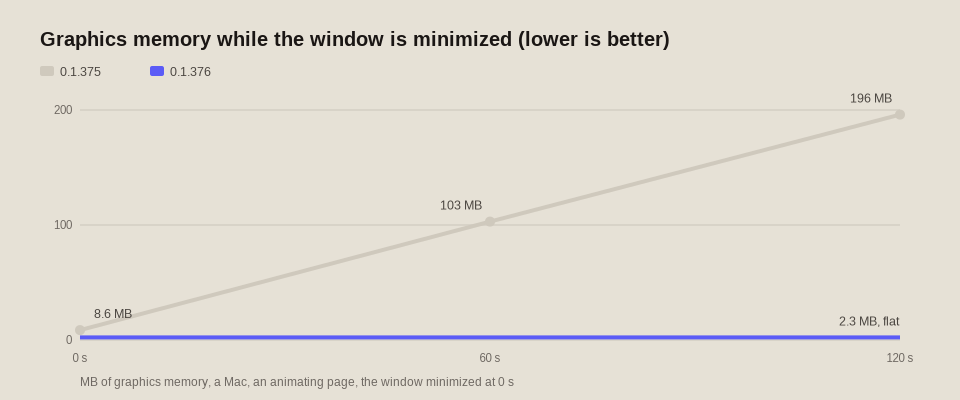
Floati draws each page on the graphics card: every frame, the parts of the page that changed are uploaded as tiles and then shown in the window. When the window is minimized, or fully covered, or the screen is locked, the system refuses to show the frame. Floati skipped the frame, which is right, but the uploads it had already queued for that frame stayed queued, and the tiles they replaced were only let go once a frame was shown again. So a minimized window over an animating page kept adding to its queue: on a Mac, graphics memory went from 8.6 MB to 103 MB after one minute and 196 MB after two, and would have kept going. Now, when a frame is refused, Floati sends what it queued and lets the graphics card free what it no longer needs. Over the same two minutes graphics memory stayed at 2.3 MB, and on restore the page showed its current state (its counter had kept counting the whole time). On Windows, the same test with an animating page and the window minimized for two minutes stayed flat both before and after this change, so Windows users were never affected; the fix changes nothing there.
Finding what keeps a closed page in memory
0.1.375 freed most pages you leave, but a few large web apps still stay behind; a code-hosting site's repository page leaves about 160 MB per visit. The engine can now load a page with some of its scripts left out and compare what stays in memory afterwards. Leaving out one script, the site's code viewer, brings the residue from about 164 MB down to 47 MB, the same as the page with none of its scripts. That narrows the search from the whole page to one script and what it asks of the engine. The fix itself is next.
바뀐 점
변경 5개- 기억과 읽기A minimized, covered or locked window over an animating page no longer grows its graphics memory (Mac: 196 MB after 2 minutes -> 2.3 MB, flat).
- 탭과 인터페이스The page is up to date as soon as the window comes back.
- 탭과 인터페이스Windows checked with the same test: never affected.
- 기억과 읽기New engine diagnostics load a page with chosen scripts left out, to find which one keeps a closed page in memory.
- 기억과 읽기Known: some large web apps still stay in memory after you close them; the cause is narrowed to one script on a code-hosting site, and the fix is next.


