모든 버전 v0.1.4077 11월 2026렌더링, JavaScript와 JIT, 웹 API와 DOM, 미디어, 탭과 인터페이스 피드

릴리스 노트는 영어로 작성되어 있습니다.

WebGL 2

WebGL 2 is here. The newest versions of the most used 3D library dropped WebGL 1, so a page built on them showed nothing at all. Floati now has the whole WebGL 2 interface with its own shading-language compiler, and it passes more of the official conformance pages than the reference browser. WebGL also reaches the screen with no copy through the processor, so a large 3D scene at retina size runs at 120 frames a second instead of 40, in less memory. Canvases are sharp on retina screens, and a heavy 3D scene shows its first frame in a third of a second instead of 23.

0 -> 344 (reference 339)WebGL 2 conformance pages passing (349)
1.26 -> 1.79Edge sharpness (reference 1.82)
40 -> 120 fps3D scene filling a retina window
주요 내용5

WebGL 2

이전이후
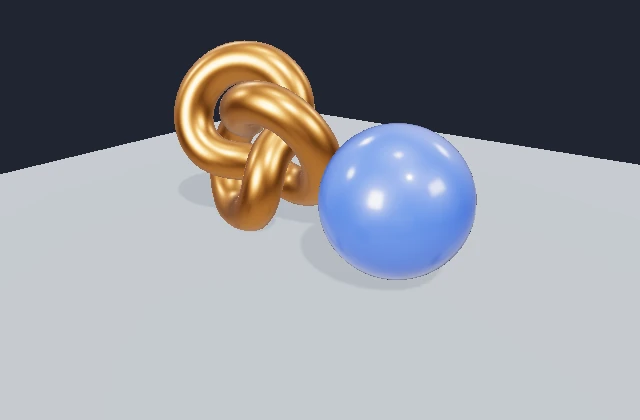
이전: A scene from the 3D library with metal, a clearcoat, an environment map and shadows: Floati 0.1.406, Floati 0.1.407 and the reference browser.
이전
이후: A scene from the 3D library with metal, a clearcoat, an environment map and shadows: Floati 0.1.406, Floati 0.1.407 and the reference browser.
이후 · v0.1.407
기준 브라우저에서 본 같은 페이지
기준 브라우저

This one started with a blank page. The newest versions of the most used 3D library no longer support WebGL 1, so a 3D page built on them showed nothing at all here. We wrote WebGL 2 in six slices: the interface, a compiler for the newer shading language with real integers, textures, buffers, draw targets and transform feedback. Our software renderer stays the oracle, so every slice is checked on the GPU against it. Windows found a bug Mac hid, a 3D texture lookup that would not compile, and Mac found one of its own: its graphics driver divides integers wrongly next to some loops, so we write division out ourselves.

A scene from the 3D library with metal, a clearcoat, an environment map and shadows: Floati 0.1.406, Floati 0.1.407 and the reference browser.

WebGL 2 conformance pages passing (349)0 -> 344 (reference 339)Pixels within 16 levels of the reference99.99%

Sharp canvases on retina screens

이전이후
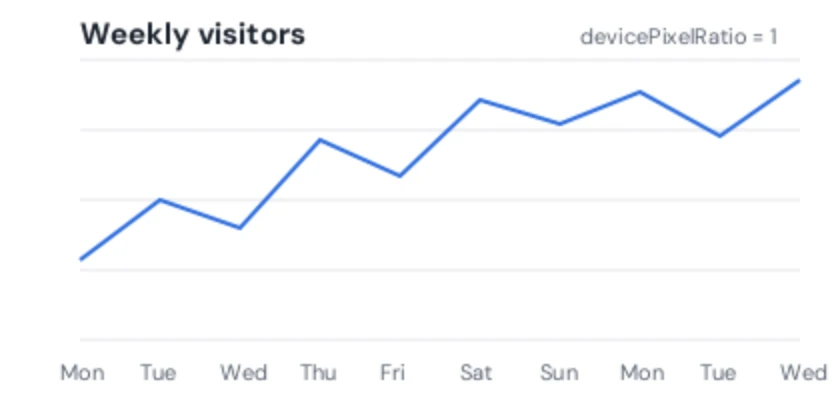
이전: A canvas chart drawn for the screen's pixel ratio: Floati before, after, and the reference browser, on a retina screen.
이전
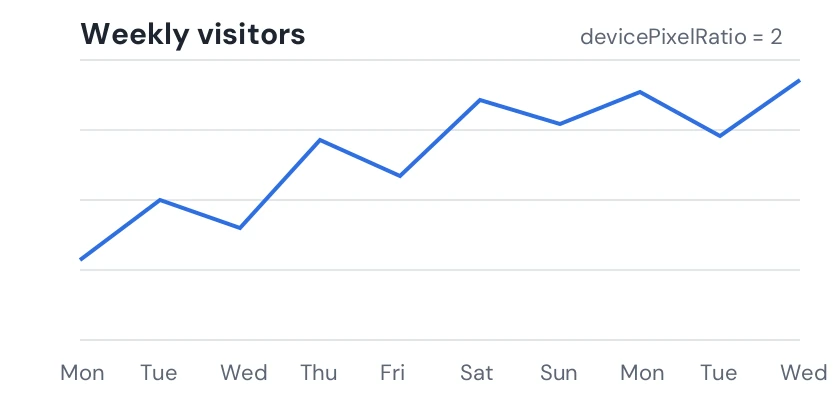
이후: A canvas chart drawn for the screen's pixel ratio: Floati before, after, and the reference browser, on a retina screen.
이후 · v0.1.407
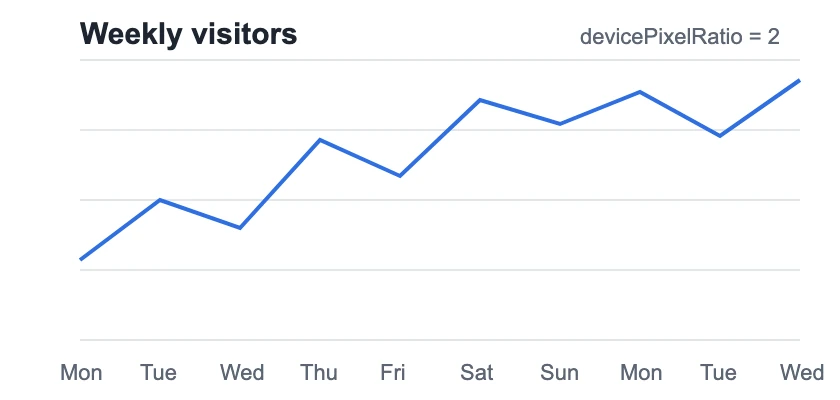
기준 브라우저에서 본 같은 페이지
기준 브라우저

We found this in the first minute of running a real 3D page in the app: it looked soft. The page asked for the device pixel ratio and was always told 1, so it drew at half size and the window stretched it. Every canvas and chart that scales itself for retina was blurry. Pages now see the real scale.

A canvas chart drawn for the screen's pixel ratio: Floati before, after, and the reference browser, on a retina screen.

Edge sharpness (reference 1.82)1.26 -> 1.79

WebGL straight to the screen

With the scene sharp, it was slow: every frame was read back from the GPU, flipped by the processor and sent back up as tiles. Now the page and the compositor share one buffer on the GPU, and the compositor draws the canvas and whatever covers it with the same arithmetic in the same order, so the pixels are the same bytes as before. Rotated canvases, filters and blend modes over a canvas still take the old path.

3D scene filling a retina window40 -> 120 fpsMemory706 MB -> 473 MBReference browser, same scene1,267 MB across 9 processes

A first frame in a third of a second

Comparing against the reference browser, our first frame took 23 seconds. A scene starts in software and moves to the GPU once it has drawn enough, and drawing enough was counted in vertices. A scene that builds its lighting first does little geometry and a lot of shading, so it stayed in software. Shading counts now. Fixing that showed two more: a scene that moved mid-frame could fall back to software for good, and a test page that compares two drawings could get one from each path. Both are fixed, each with a law that fails without it.

First frame of a 3D scene with lightingabout 23 s -> 325 msLowest frame rate over 69 sabout 110 fps

Found on our own page

The release check loads 14 sites, and one of them is ours. It showed an error: a script read the observer from its MutationObserver callback and found nothing, because we never passed it. Looking closer, our callbacks also ran at the wrong moment among promise jobs, and disconnecting kept records it should drop. All three are fixed.

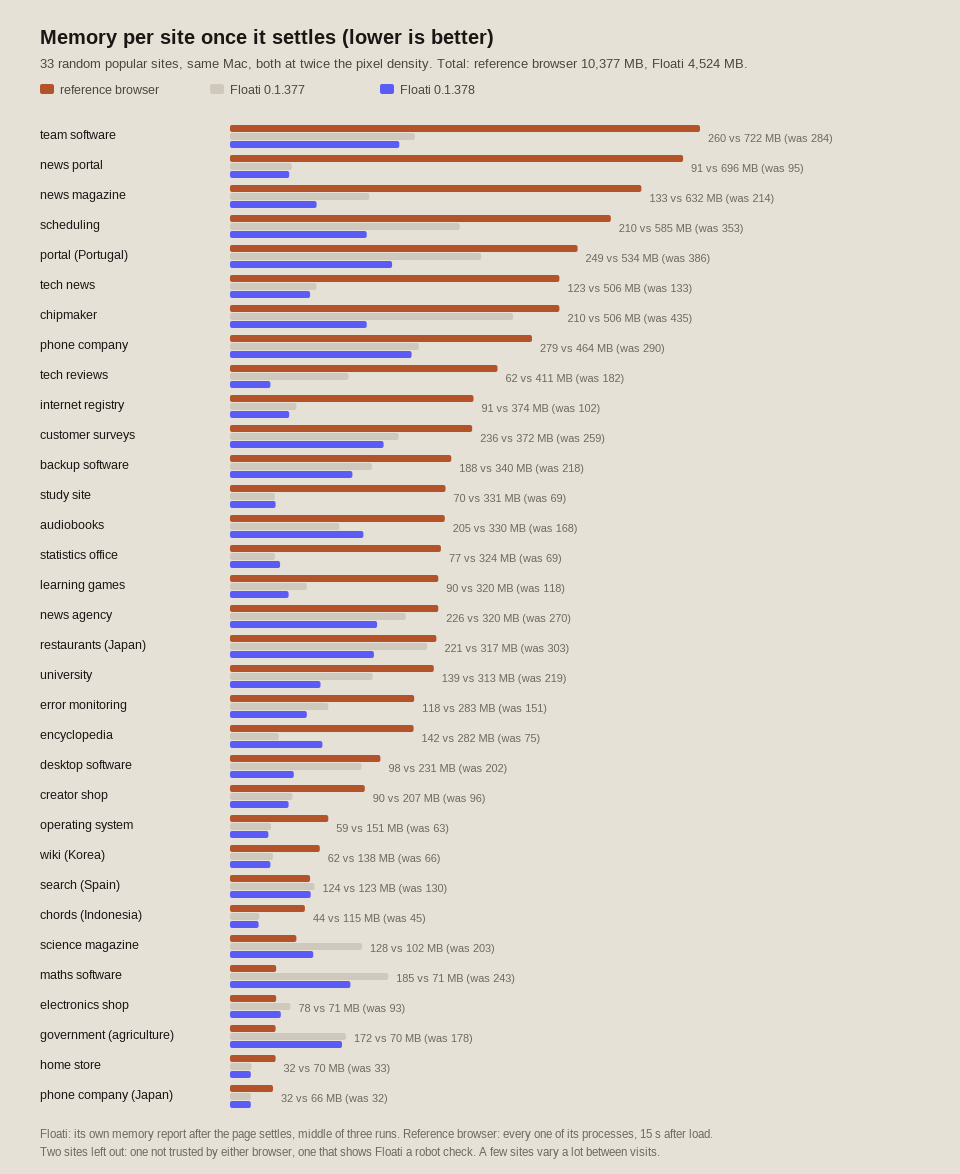
Sites in the release check with no Floati-only errors13 -> 14 of 14

바뀐 점

변경 36개
  1. JavaScript와 JITNew: WebGL 2. getContext('webgl2') returns a full WebGL2RenderingContext with every method and constant, vertex arrays, instancing, range draws and every buffer target. Switch: FLOATI_NO_WEBGL2.
  2. 렌더링New: shaders written in GLSL ES 3.00 compile and run: in and out, layout locations, unsigned and exact integers, non-square matrices, switch, while and do, bit operations, flat inputs, texelFetch, textureLod, textureGrad, textureOffset, textureSize and the vertex and instance ids.
  3. 렌더링Speed: shaders in the older shading language take none of the new paths and run at their old speed.
  4. JavaScript와 JITNew: WebGL 2 textures: every sized format, texStorage, 3D and array textures, sampler objects, base and max level, integer and shadow samplers, and pixel buffers for upload and read.
  5. 렌더링New: depth textures and partial uploads run on the GPU, so changing part of a texture no longer sends all of it. WebGL 1 pages get the partial uploads too.
  6. 렌더링New: uniform blocks, buffer copies, getBufferSubData, sync objects and queries, including occlusion queries on the GPU.
  7. 렌더링Speed: a buffer filled again with the same size sends only the bytes that changed. 1024 draws from one uniform buffer went from 26 s and 680 MB to 4 s and 108 MB.
  8. 렌더링New: several draw targets at once, every renderbuffer format, multisampled renderbuffers, blitFramebuffer, clearBuffer, readBuffer and invalidateFramebuffer.
  9. 웹 API와 DOMSpeed: a multisampled image is resolved inside the pass that drew it, with no pass of its own, and invalidating it after a blit drops samples nobody needs: 2.9 against 4.2 ms a frame at 2048 by 2048 with four samples.
  10. 렌더링New: transform feedback, so a vertex shader can write its results back into buffers, on the GPU and in software.
  11. 렌더링New: compressed textures in the S3TC, RGTC, BPTC, ETC1, ETC2 and EAC formats, decoded by our own code. The GPU gets plain texels, so every machine draws the same pixels and offers the same formats.
  12. 렌더링New: drawingBufferStorage with sRGB and half float buffers, and per-target blending with OES_draw_buffers_indexed.
  13. 미디어New: every kind of image source reaches a texture: a playing video made by a script, an ImageBitmap, an OffscreenCanvas, an image from a blob, and an SVG image made by a script.
  14. 미디어FIX: a video frame uploaded to a texture costs one copy and no allocation, the same frame twice costs nothing, and a video turns the way its file says.
  15. 렌더링FIX: an ImageBitmap keeps the alpha it was asked for, and an OffscreenCanvas can be drawn into with WebGL.
  16. 렌더링FIX: a texture upload is never lost when the GPU is still reading the one before it.
  17. 탭과 인터페이스FIX: a 3D texture lookup with an offset compiles on Windows. It failed there and worked on Mac.
  18. JavaScript와 JITSafety: a WebGL draw is bounded in work and in vertices, a loop in a shader on the GPU always ends, a draw in software stops after 4 seconds, and a page cannot ask for a texture of 1 GB or more.
  19. JavaScript와 JITFIX: integer division in WebGL 2 shaders is exact on Mac. The graphics driver got it wrong next to some loops, in about one program in a hundred.
  20. 렌더링New: WebGL reaches the screen with no readback. The page's drawing buffer goes straight to the compositor on the GPU, with whatever is painted over it, byte for byte the same as before. Switch: FLOATI_NO_CANVAS_LAYER.
  21. 렌더링FIX: rounded corners and opacity on a WebGL canvas run on the GPU at full rate.
  22. 웹 API와 DOMFIX: opacity on an element that is only an image was ignored. A faded logo showed at full strength.
  23. 웹 API와 DOMSpeed: a WebGL canvas scrolled out of view sends no frames.
  24. 렌더링FIX: pages see the real device pixel ratio. It was always 1, so every canvas and 3D scene was drawn at half size and stretched on a retina screen.
  25. 탭과 인터페이스FIX: a page that sizes itself while it loads sees the window's height. It saw a height three times too tall.
  26. 웹 API와 DOMFIX: a heavy 3D scene shows its first frame in a third of a second. Shader work did not count toward moving a scene to the GPU, so a scene that built its lighting first ran its first 23 seconds in software.
  27. 웹 API와 DOMFIX: a WebGL scene that moves to the GPU in the middle of a frame stays there. A clear on a target holding depth from software sent it back to software for good, at 0.2 frames a second.
  28. 웹 API와 DOMFIX: a page that reads its own pixels is moved to the GPU only between frames, so a test that compares two drawings sees one path.
  29. JavaScript와 JITFIX: MutationObserver callbacks get their observer as the second argument, run in order among promise jobs, and lose nothing on disconnect. Our own browser page showed an error because of it.
  30. JavaScript와 JITSpeed: a loop with a return or break moves into compiled code and stays there. A first call over four million elements went from 379 ms to 3 ms.
  31. 렌더링FIX: modules with long import lists load. A library that imported more than about 30 names at once never started.
  32. JavaScript와 JITFIX: fn.apply with a typed array or an array-like passes its elements, a typed array made from another converts each element, and canvas width="64px" on WebGL means 64.
  33. 렌더링FIX: a backslash before a new line in a template literal is removed, and \0 is a NUL character.
  34. 렌더링Speed: the storage button keeps one database connection instead of opening the encrypted file on every refresh, which took 3.6% of a core.
  35. 탭과 인터페이스FIX: the dead Never suspend items are gone from the tab menu, and the tab's hover card reads Pages and engine.
  36. 렌더링Testing: new laws cover WebGL 2, the canvas layer and observers. The canvas layer laws were checked by changing the code one edit at a time: 21 of 23 edits were caught, and the 2 left change nothing.

v0.1.407 이후 전부를 한곳에서

버전

v0.1.0 - 0.1.9 · 10 7월 2026418v0.1.427 · 25 11월 2026

11월2026 · 버전 6개

10월2026 · 버전 19개

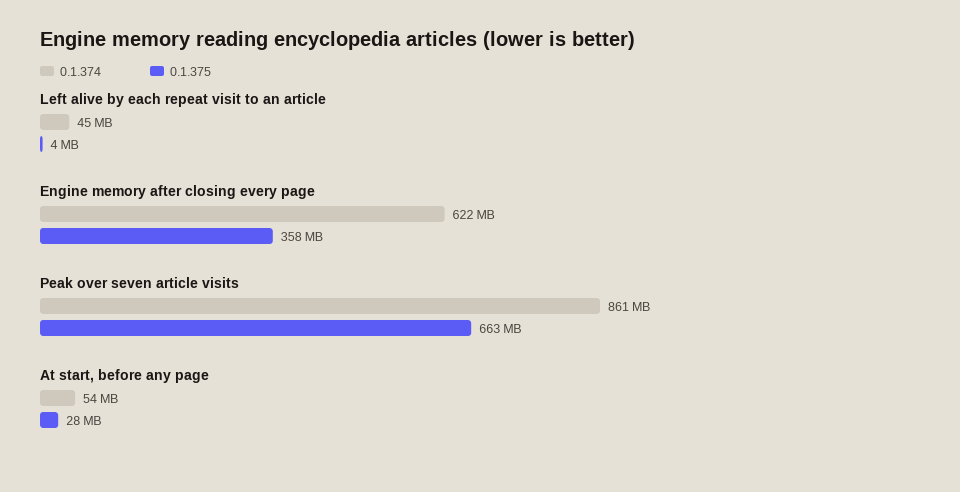
38631 10월Real sites render closer to the reference browserv0.1.386 · 렌더링14 38429 10월Safety review, a rare crash fixed, functions compiled soonerv0.1.384 · 기억과 읽기46 38025 10월Scrolling boxes scroll, pages look right, and scripts from other sites need permissionv0.1.380 · 렌더링16 37924 10월Pages laid out the way their authors wrote them, and less memory againv0.1.379 · 렌더링22 37823 10월Other sites' data stays private, and less memory againv0.1.378 · 기억과 읽기 37522 10월Closed pages let go, sites stay apart, and fonts stop costing memoryv0.1.375 · 기억과 읽기9 37321 10월Every page on our own engine, two pages side by side, videos that keep playing, and your own clockv0.1.373 · 탭과 인터페이스17 37221 10월Your data stays put, your choices stick, and dictation that really listensv0.1.372 · 렌더링 37121 10월Drop files onto pages, dictate without your voice leaving the Mac, and controllers that rumblev0.1.371 · 웹 API와 DOM · 확인해 보기 37021 10월Open your files, share to your phone, have pages read aloud, install sites as apps, play with a controller, and accented text drawn rightv0.1.370 · 개인정보 보호와 Shields · 확인해 보기11 36920 10월Passkeys with Touch ID and Windows Hello, sites that work offline, notifications you allow, and devices asked for first, all kept on your devicev0.1.369 · 개인정보 보호와 Shields · 확인해 보기9 36820 10월A site's own security rules are kept the whole time the page runs, Trusted Types, a map of every unsafe write in DevTools, and animations from scriptv0.1.368 · 개인정보 보호와 Shields · 확인해 보기 36619 10월Events, custom form controls, fonts and navigation work the way the web standards say: the Web APIs score rises from 53 to 59v0.1.366 · 웹 API와 DOM · 확인해 보기9 3467 10월A real performance timeline, site icons from the engine with a lookalike check, and forms that lay out rightv0.1.346 · 렌더링 · 확인해 보기14 3457 10월Real WebGL, a real 2D canvas, and canvas text that matches the reference browserv0.1.345 · 렌더링 · 확인해 보기10 3436 10월Sign-ins that stay signed in, a real IndexedDB, and a storage button that shows what sites keepv0.1.343 · 개인정보 보호와 Shields · 확인해 보기25 3385 10월Pages load faster, render truer and gain a dozen modern web features, each one checked against the reference browserv0.1.338 · 웹 API와 DOM · 확인해 보기19 3362 10월Site controls that do what they say: permissions that really ask, and Shields per sitev0.1.336 · 개인정보 보호와 Shields13 3321 10월Pinned tabs on the left or the right, and an honest measure of the web platformv0.1.332 · 탭과 인터페이스9

9월2026 · 버전 26개

31926 9월A PDF viewer that does what Acrobat Pro charges forv0.1.319 · 탭과 인터페이스16 31725 9월Closer to the reference browser, and no more address bar tricksv0.1.317 · 웹 API와 DOM 30924 9월Pages arrive like they do in the reference browser, in a fraction of the memoryv0.1.309 · 네트워크13 30423 9월Sound and video, decoded by our own codev0.1.304 · 미디어 30322 9월HTTP/3 is on, and it is ours: the fastest web protocol, built from scratchv0.1.303 · 네트워크 30222 9월The site you open stays your business, and the browser checks every certificate itselfv0.1.302 · 개인정보 보호와 Shields 30122 9월Sites can no longer follow you between other sites, and the next page starts soonerv0.1.301 · 개인정보 보호와 Shields 29116 9월A private wayback machine for pages you seal, cited answers that open where you read them, and a privacy report that is ready the instant a page loadsv0.1.291 · 기억과 읽기 29015 9월Floati spots trackers no list has caught, answers your questions from your own reading, and gets even closer to the pixelv0.1.290 · 개인정보 보호와 Shields 28915 9월A wave of rendering fixes: images, text wrapping, margins and flexible layouts closer to the pixelv0.1.289 · 렌더링 28815 9월The pages where you type a password stay out of your memory, and text renders truer to the pagev0.1.288 · 기억과 읽기 28711 9월A downloads manager that looks out for you, and scan-free QR that reads any code on a pagev0.1.287 · 탭과 인터페이스 28211 9월One tracker can't follow you between the sites it sits on, and insecure content shown and healedv0.1.282 · 개인정보 보호와 Shields 28011 9월An honest block count, and font fingerprinting defeatedv0.1.280 · 개인정보 보호와 Shields 27911 9월See your protection at a glance, tap for the detailv0.1.279 · 렌더링 27811 9월A tracker can no longer follow you from one site to the nextv0.1.278 · 렌더링 27710 9월See the security, do not just trust itv0.1.277 · 렌더링 27610 9월Security you can check: an honest ledger, a referrer firewall, and mixed content shut downv0.1.276 · 개인정보 보호와 Shields 27510 9월Timing Shield and a cleaner device surfacev0.1.275 · 렌더링 27410 9월Fingerprint Shield: see and prove what a page tried to learn about youv0.1.274 · 기억과 읽기 2549 9월Dialogs and popovers: modern overlays that layer correctlyv0.1.254 · 렌더링 2468 9월Memory: your browser remembers what you read, and can prove itv0.1.246 · 기억과 읽기 2183 9월A calmer launch and a tidier browserv0.1.218 · 탭과 인터페이스 2173 9월Your passwords, the Floati wayv0.1.217 · 탭과 인터페이스 2143 9월Updates that put you back exactly where you left off, and tab groups that finally behavev0.1.214 · 탭과 인터페이스 2061 9월Explain this page: the browser now understands what a site does, and can prove itv0.1.206 · 개인정보 보호와 Shields

8월2026 · 버전 23개

20328 8월Pages you open with the Floati engine now render on your graphics cardv0.1.203 · 렌더링 18418 8월Articles with a sidebar box now flow around it, the way they shouldv0.1.184 · 개인정보 보호와 Shields 18318 8월One report: what did this page actually do to me?v0.1.183 · 개인정보 보호와 Shields 18218 8월Now it also spots the audio version of that tracking trickv0.1.182 · 개인정보 보호와 Shields 18118 8월See when a page tries to fingerprint you (and know it failed)v0.1.181 · 개인정보 보호와 Shields 18018 8월See how much of a whole page's download actually showed up on screenv0.1.180 · 개인정보 보호와 Shields 17718 8월Bytes-to-Pixels Ledger: which of a page's downloaded bytes actually painted anythingv0.1.177 · 개인정보 보호와 Shields 17618 8월Witness Mode: cryptographic, offline proof of what a site showed you (a world-first)v0.1.176 · 개인정보 보호와 Shields 17418 8월Counterfactual Browsing: see exactly what a script did to your page (a world-first)v0.1.174 · 개인정보 보호와 Shields 17318 8월Pixel Provenance: a click can only reach what you actually see (a world-first)v0.1.173 · 개인정보 보호와 Shields 17218 8월Split-motion video decodes: the VP8 inter path is complete, real WebM streams bit-exactv0.1.172 · 미디어 17016 8월Render Receipts: seal a page into proof the reference browser structurally cannot offerv0.1.170 · 웹 API와 DOM 14314 8월Unmodified Puppeteer drives the engine end to endv0.1.143 · JavaScript와 JIT 12813 8월HSTS: sites that demand https are never reached over plaintext, not even oncev0.1.128 · 네트워크 12713 8월Encrypted DNS (DoH) inside the engine, so your network cannot see which sites you look upv0.1.127 · 네트워크 12013 8월DevTools: a WebSocket transport, so external tools can attachv0.1.120 · DevTools 1057 8월HTTP/2: the modern web transport, from scratchv0.1.105 · 미디어 1017 8월AES-GCM: the authenticated encryption the real web actually usesv0.1.101 · 개인정보 보호와 Shields 1006 8월The browser can be driven, not just watched: a DevTools Protocol that mutates the real pagev0.1.100 · DevTools 956 8월Real, deterministic Web Audio (it used to be a silent stub)v0.1.95 · 미디어 926 8월Real encryption in the browser, and the fix that made it usablev0.1.92 · 렌더링 916 8월Method calls run at machine speed - and a real crash fixed on the wayv0.1.91 · JavaScript와 JIT 704 8월One press, and you are on the new versionv0.1.70 · 탭과 인터페이스

7월2026 · 버전 7개