모든 버전 v0.1.37924 10월 2026렌더링, 웹 API와 DOM, 개인정보 보호와 Shields, 접근성, 기억과 읽기 피드

릴리스 노트는 영어로 작성되어 있습니다.

Pages laid out the way their authors wrote them, and less memory again

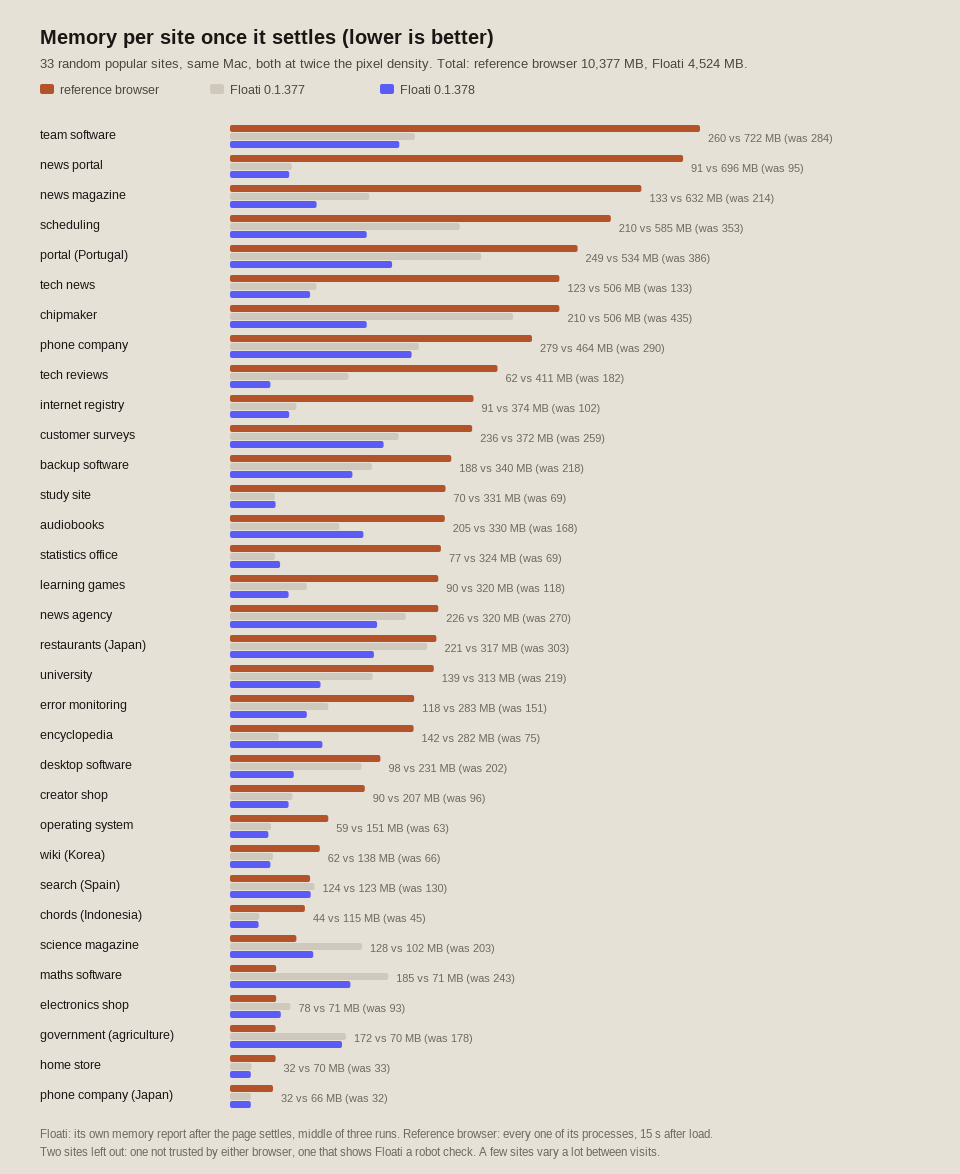
A page-drawing release with more memory saved. Comparing Floati's picture of a page with the reference browser's, pixel by pixel, on a set of well-known sites showed where Floati laid pages out wrongly, and fourteen of those mistakes are fixed: which style rule wins when two disagree, how a line break, a grid, a flexible row and a font size written as a sum behave, where a line of text sits, and more. A design framework's documentation page went from 26 percent of its pixels different to 5, a news front page from 35 to 20. On memory, the same 33 randomly picked popular sites now use 4,301 MB in Floati against 10,377 MB in the reference browser on the same Mac (59 percent less; 0.1.378 used 4,524), the average site settles at 130 MB, and Floati uses less than the reference browser on 29 of the 33. Pictures nobody can see, because they are fully transparent or hidden, now give back their memory, and pictures on sharp screens are kept at exactly the pixels they are drawn at. Measured and tested on a Mac; the Windows build passes the same engine tests.

26 -> 5 percentA design framework's documentation page, pixels different from the reference
reference browser 10,377 MB -> Floati 4,301 MB33 random sites, total memory
주요 내용2

Pages look the way they were written
이전이후
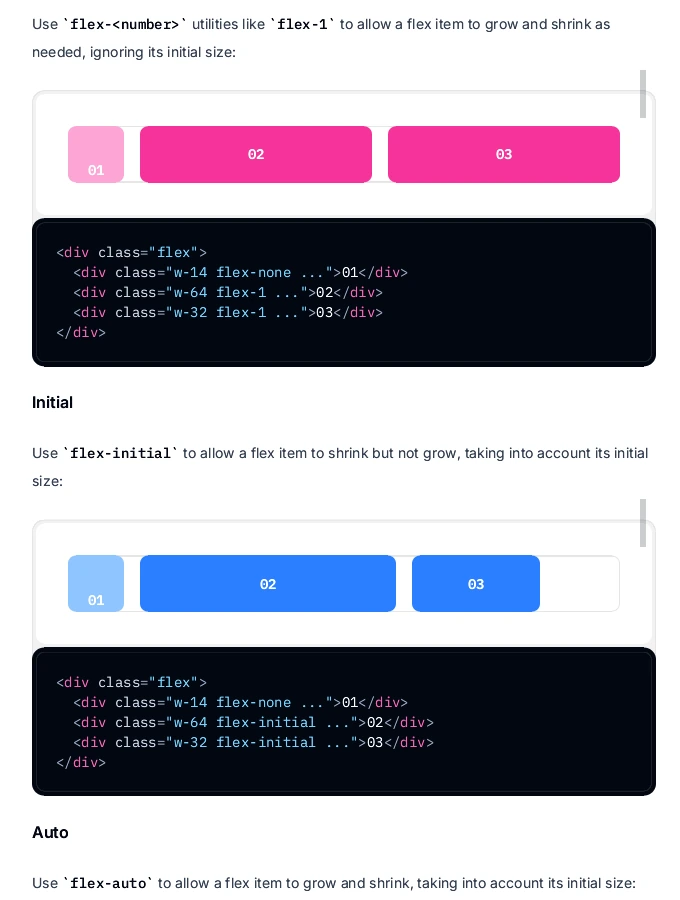
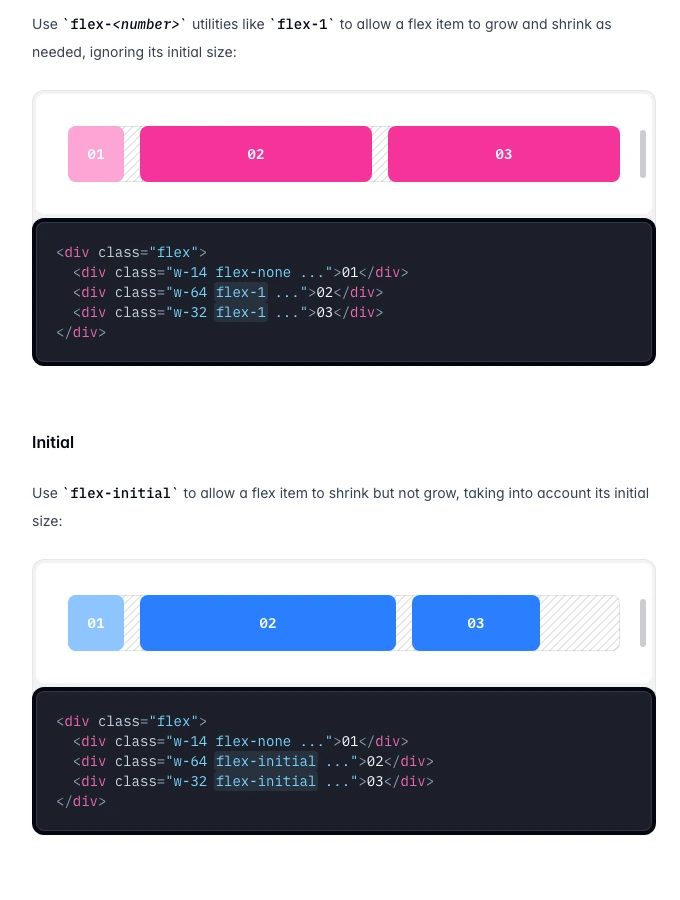
이전: A design framework's documentation page: Floati 0.1.378, Floati 0.1.379 and the reference browser. The gaps under each example now match, so every heading below sits where the page puts it.
이전
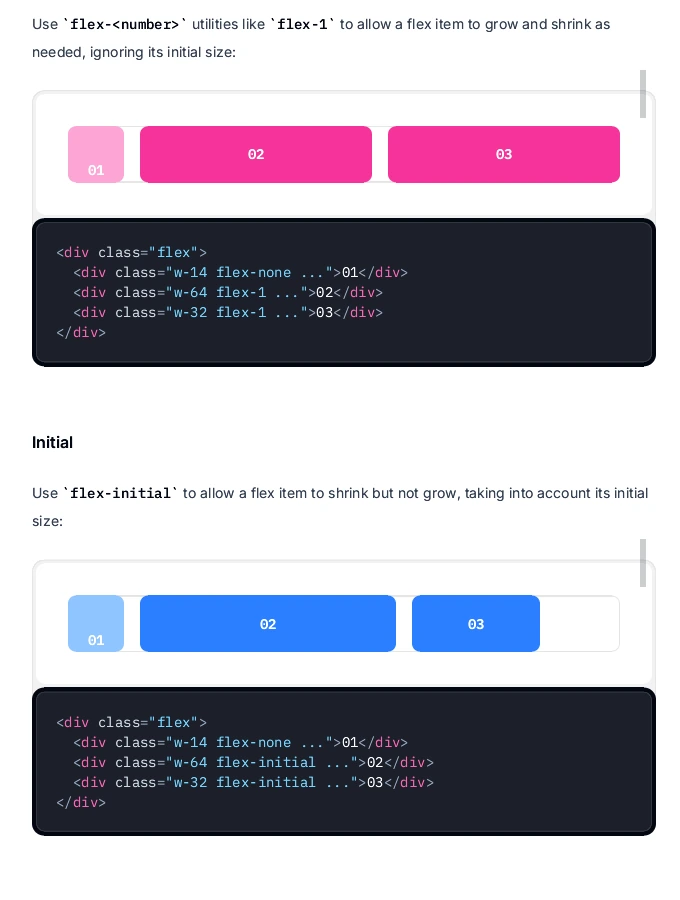
이후: A design framework's documentation page: Floati 0.1.378, Floati 0.1.379 and the reference browser. The gaps under each example now match, so every heading below sits where the page puts it.
이후 · v0.1.379
기준 브라우저에서 본 같은 페이지
기준 브라우저

To find layout mistakes we draw well-known pages in Floati and in the reference browser and compare them pixel by pixel, then shrink each difference down to a few lines of page code and check that rule against the reference. Fourteen fixes came out of it. When a site's style sheet marks a rule as important it now beats a style written on the element itself, as the standard says; it used to lose, so menus and buttons sat in the wrong place. Rules written with the newer selector forms (is, where, not, has) now weigh exactly as much as they should, so the right one wins. A line break at the end of a line no longer starts an empty extra line. A font size written as a sum (a calc) is worked out once, so everything inside inherits the size and not the formula. A line height written in em or percent is fixed where it is written, so text inside a bigger heading does not grow its own gaps. Grids now share the height of a tall item among the rows it spans the way the reference does and understand rows named by the page, flexible rows stretch their items to the exact height the page set, an overlay over a picture covers the whole picture, labels meant only for screen readers no longer push the header down, and a button with a two-line label lines up with its neighbours. Every fix has a test that fails without it.

A design framework's documentation page: Floati 0.1.378, Floati 0.1.379 and the reference browser. The gaps under each example now match, so every heading below sits where the page puts it.

A design framework's documentation page, pixels different from the reference26 -> 5 percentA news front page35 -> 20 percent13 well-known sites, total difference181 -> about 140

Less memory on the same random sites

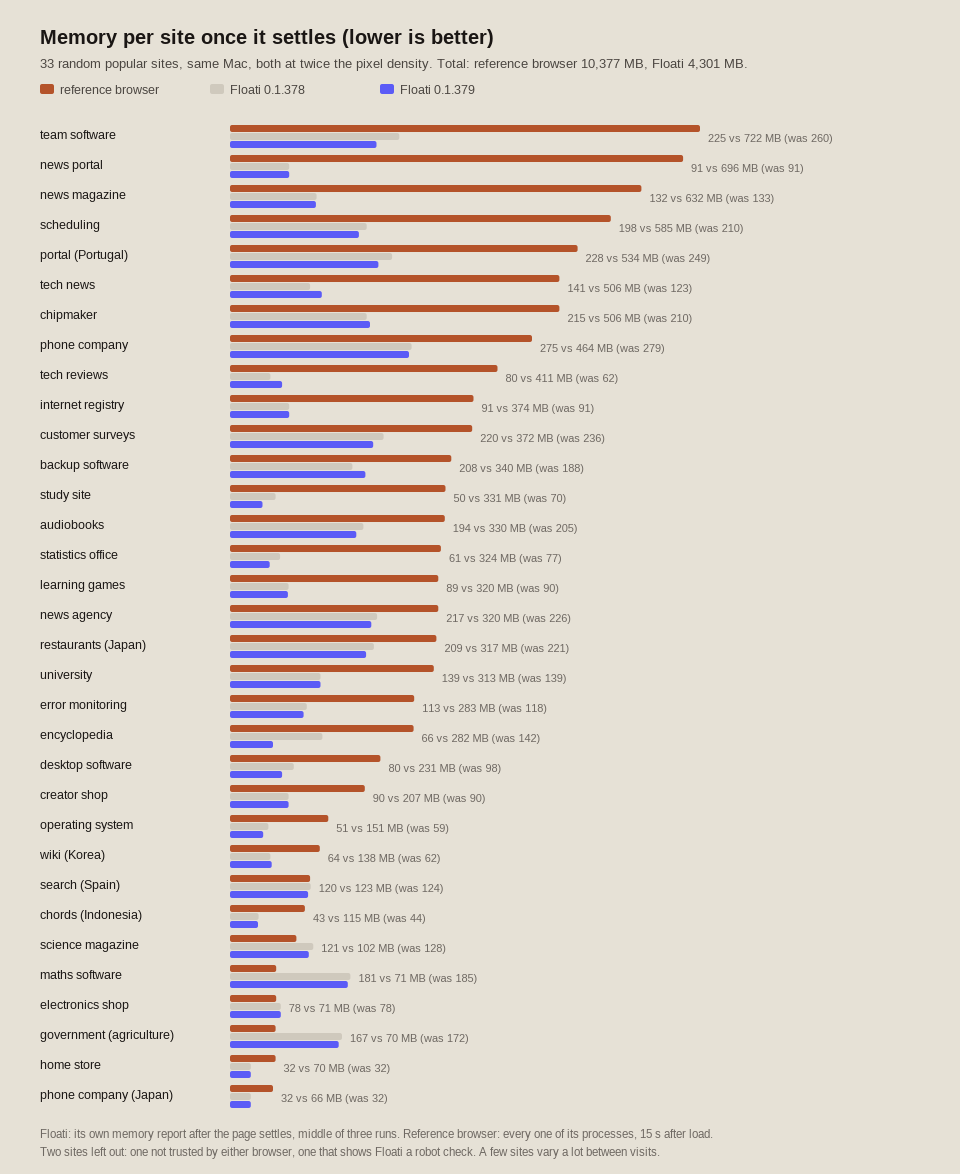
Memory per site after it settles: the reference browser, Floati 0.1.378 and Floati 0.1.379, same Mac, same screen density

The same 33 sites as in the last two releases, picked at random from a public list of the most visited websites, opened in Floati on the same Mac at twice the pixel density, three times each (the middle result is shown). Floati used 4,301 MB in total, against 10,377 MB for the reference browser and 4,524 MB for 0.1.378, and less than the reference browser on 29 of the 33. Three changes did most of it. A picture that is fully transparent or hidden (the resting slides of a fading slideshow, for example) is not drawn, so it now gives its memory back like a picture far down the page, and takes it again the moment it shows. On a sharp screen a picture is kept at exactly the pixels it is drawn at, where Floati used to keep a quarter more in case the box grew, and background pictures are kept at the size they are painted, not their full file size. And each picture keeps only one form: the compressed file or the drawn pixels, whichever it needs, never both. An encyclopedia went from 142 to 66 MB, a study site from 70 to 50, a team software site from 260 to 225. Four sites still use more than the reference browser: a maths software site, a government site, a science magazine and a shop, mostly because of large pictures and the compiled code of scripts that never run.

33 random sites, total memoryreference browser 10,377 MB -> Floati 4,301 MBFloati 0.1.378 -> 0.1.3794,524 -> 4,301 MBAverage site, settled130 MBSites where Floati uses less29 of 33

바뀐 점

변경 22개
  1. 렌더링An !important rule in a style sheet now beats a style written directly on the element, the order the standard sets (normal rules, then the element's own style, then important rules). A page that forces a margin with !important now gets it.
  2. 렌더링A scrolling panel inside a column of fixed height keeps the height the column gives it and scrolls its own content, instead of growing to fit everything and spilling over the panel below.
  3. 웹 API와 DOMSelector weights follow the newest standard: :where() adds nothing, while :is(), :not() and :has() weigh as much as their strongest part. A CSS framework's 'weakest' typography rules no longer beat stronger ones, so its documentation headings get the right spacing (pixel difference from the reference 26 -> 17 percent).
  4. 렌더링A line break (<br>) ends the line it sits on: one at the end of a line no longer opens an extra empty line, and one at the start breaks before what follows. Code blocks that end every line with a break were drawn twice as tall.
  5. 렌더링A font size written as a formula (calc(), such as 'one em minus 20 percent') is worked out once where it is written, so nested elements inherit the result instead of shrinking the text again at every level. A docs site's live code editor drew its code as faint dashes 4 pixels tall; it is 13.6 pixels now, as in the reference.
  6. 렌더링A line height written in em, percent or rem is turned into pixels where it is declared and passed down as pixels, so a large heading inside a smaller block no longer gets a line nearly twice too tall. Plain numbers still pass down as numbers, as the standard says.
  7. 렌더링A flexible row with a set height stretches its items to exactly that height; taller content now overflows instead of making the row taller (a news site's 32 pixel logo row had become 36).
  8. 렌더링An inline block whose text sits inside nested boxes lines up on that text's baseline, so navigation bars and story lists built that way are no longer taller than they should be (one list was 107 pixels too tall).
  9. 렌더링A full-cover overlay inside a box whose height comes from its content now sizes against that box's final height; such overlays came out 0 pixels tall.
  10. 렌더링Flex items sized with fit-content, max-content or min-content keep that size instead of being stretched across the card.
  11. 렌더링A stretched flex column counts as having a known height for what is inside it, so footers pushed to the bottom with margin-top: auto now sit at the bottom of their card.
  12. 접근성Labels hidden for screen readers (positioned off-screen) take no room in the line they sit in; they made a news site's masthead 31 pixels taller.
  13. 렌더링Grid items that span several rows share their extra height the way the standard describes, filling rows that can still grow first; four common shapes now match the reference exactly.
  14. 렌더링Grids understand named row lines (grid-row: headline), and row templates that name their lines size their rows correctly; the names used to be read as extra rows.
  15. 기억과 읽기Pictures that are invisible (inside something fully transparent or hidden) give their memory back and take it again only when they show. A fade carousel's waiting slides are exactly this.
  16. 기억과 읽기Each picture now keeps only the smaller of its two forms it needs: a picture on screen keeps its pixels, a hidden or far one only its file. Photo PNGs could never be given back before. A restaurant guide went from 252 to 211 MB.
  17. 기억과 읽기On sharp (2x) screens a picture keeps exactly the pixels its box shows, with no extra quarter kept 'for zooming' (zooming decodes it again at the new size anyway), and is shrunk once it is 1.2 times too wide instead of 1.5. A chipmaker's site went from 230 to 199 MB.
  18. 기억과 읽기Background pictures are shrunk to the size their drawn copy needs, whether they are covered, contained or tiled, and grow back when the box gets bigger. A phone company kept a 3200 pixel strip behind a box 2 pixels tall.
  19. 렌더링Groundwork for compiling functions only when they first run: those functions now share their script's text instead of each keeping a copy.
  20. 기억과 읽기Measured before building: combining half-empty memory pages would give back only 1 to 2 MB on the heaviest sites, so that idea was set aside in favour of the image work above.
  21. 기억과 읽기33 random popular sites: 4,301 MB in Floati (0.1.378: 4,524) against 10,377 MB in the reference browser; the average site settles at 130 MB.
  22. 개인정보 보호와 ShieldsKnown: module scripts from another site are not yet checked like other requests; four sites still use more memory than the reference browser.

v0.1.379 이후 전부를 한곳에서

버전

v0.1.0 - 0.1.9 · 10 7월 2026418v0.1.427 · 25 11월 2026

11월2026 · 버전 6개

10월2026 · 버전 19개

38631 10월Real sites render closer to the reference browserv0.1.386 · 렌더링14 38429 10월Safety review, a rare crash fixed, functions compiled soonerv0.1.384 · 기억과 읽기46 38025 10월Scrolling boxes scroll, pages look right, and scripts from other sites need permissionv0.1.380 · 렌더링16 37924 10월Pages laid out the way their authors wrote them, and less memory againv0.1.379 · 렌더링22 37823 10월Other sites' data stays private, and less memory againv0.1.378 · 기억과 읽기 37522 10월Closed pages let go, sites stay apart, and fonts stop costing memoryv0.1.375 · 기억과 읽기9 37321 10월Every page on our own engine, two pages side by side, videos that keep playing, and your own clockv0.1.373 · 탭과 인터페이스17 37221 10월Your data stays put, your choices stick, and dictation that really listensv0.1.372 · 렌더링 37121 10월Drop files onto pages, dictate without your voice leaving the Mac, and controllers that rumblev0.1.371 · 웹 API와 DOM · 확인해 보기 37021 10월Open your files, share to your phone, have pages read aloud, install sites as apps, play with a controller, and accented text drawn rightv0.1.370 · 개인정보 보호와 Shields · 확인해 보기11 36920 10월Passkeys with Touch ID and Windows Hello, sites that work offline, notifications you allow, and devices asked for first, all kept on your devicev0.1.369 · 개인정보 보호와 Shields · 확인해 보기9 36820 10월A site's own security rules are kept the whole time the page runs, Trusted Types, a map of every unsafe write in DevTools, and animations from scriptv0.1.368 · 개인정보 보호와 Shields · 확인해 보기 36619 10월Events, custom form controls, fonts and navigation work the way the web standards say: the Web APIs score rises from 53 to 59v0.1.366 · 웹 API와 DOM · 확인해 보기9 3467 10월A real performance timeline, site icons from the engine with a lookalike check, and forms that lay out rightv0.1.346 · 렌더링 · 확인해 보기14 3457 10월Real WebGL, a real 2D canvas, and canvas text that matches the reference browserv0.1.345 · 렌더링 · 확인해 보기10 3436 10월Sign-ins that stay signed in, a real IndexedDB, and a storage button that shows what sites keepv0.1.343 · 개인정보 보호와 Shields · 확인해 보기25 3385 10월Pages load faster, render truer and gain a dozen modern web features, each one checked against the reference browserv0.1.338 · 웹 API와 DOM · 확인해 보기19 3362 10월Site controls that do what they say: permissions that really ask, and Shields per sitev0.1.336 · 개인정보 보호와 Shields13 3321 10월Pinned tabs on the left or the right, and an honest measure of the web platformv0.1.332 · 탭과 인터페이스9

9월2026 · 버전 26개

31926 9월A PDF viewer that does what Acrobat Pro charges forv0.1.319 · 탭과 인터페이스16 31725 9월Closer to the reference browser, and no more address bar tricksv0.1.317 · 웹 API와 DOM 30924 9월Pages arrive like they do in the reference browser, in a fraction of the memoryv0.1.309 · 네트워크13 30423 9월Sound and video, decoded by our own codev0.1.304 · 미디어 30322 9월HTTP/3 is on, and it is ours: the fastest web protocol, built from scratchv0.1.303 · 네트워크 30222 9월The site you open stays your business, and the browser checks every certificate itselfv0.1.302 · 개인정보 보호와 Shields 30122 9월Sites can no longer follow you between other sites, and the next page starts soonerv0.1.301 · 개인정보 보호와 Shields 29116 9월A private wayback machine for pages you seal, cited answers that open where you read them, and a privacy report that is ready the instant a page loadsv0.1.291 · 기억과 읽기 29015 9월Floati spots trackers no list has caught, answers your questions from your own reading, and gets even closer to the pixelv0.1.290 · 개인정보 보호와 Shields 28915 9월A wave of rendering fixes: images, text wrapping, margins and flexible layouts closer to the pixelv0.1.289 · 렌더링 28815 9월The pages where you type a password stay out of your memory, and text renders truer to the pagev0.1.288 · 기억과 읽기 28711 9월A downloads manager that looks out for you, and scan-free QR that reads any code on a pagev0.1.287 · 탭과 인터페이스 28211 9월One tracker can't follow you between the sites it sits on, and insecure content shown and healedv0.1.282 · 개인정보 보호와 Shields 28011 9월An honest block count, and font fingerprinting defeatedv0.1.280 · 개인정보 보호와 Shields 27911 9월See your protection at a glance, tap for the detailv0.1.279 · 렌더링 27811 9월A tracker can no longer follow you from one site to the nextv0.1.278 · 렌더링 27710 9월See the security, do not just trust itv0.1.277 · 렌더링 27610 9월Security you can check: an honest ledger, a referrer firewall, and mixed content shut downv0.1.276 · 개인정보 보호와 Shields 27510 9월Timing Shield and a cleaner device surfacev0.1.275 · 렌더링 27410 9월Fingerprint Shield: see and prove what a page tried to learn about youv0.1.274 · 기억과 읽기 2549 9월Dialogs and popovers: modern overlays that layer correctlyv0.1.254 · 렌더링 2468 9월Memory: your browser remembers what you read, and can prove itv0.1.246 · 기억과 읽기 2183 9월A calmer launch and a tidier browserv0.1.218 · 탭과 인터페이스 2173 9월Your passwords, the Floati wayv0.1.217 · 탭과 인터페이스 2143 9월Updates that put you back exactly where you left off, and tab groups that finally behavev0.1.214 · 탭과 인터페이스 2061 9월Explain this page: the browser now understands what a site does, and can prove itv0.1.206 · 개인정보 보호와 Shields

8월2026 · 버전 23개

20328 8월Pages you open with the Floati engine now render on your graphics cardv0.1.203 · 렌더링 18418 8월Articles with a sidebar box now flow around it, the way they shouldv0.1.184 · 개인정보 보호와 Shields 18318 8월One report: what did this page actually do to me?v0.1.183 · 개인정보 보호와 Shields 18218 8월Now it also spots the audio version of that tracking trickv0.1.182 · 개인정보 보호와 Shields 18118 8월See when a page tries to fingerprint you (and know it failed)v0.1.181 · 개인정보 보호와 Shields 18018 8월See how much of a whole page's download actually showed up on screenv0.1.180 · 개인정보 보호와 Shields 17718 8월Bytes-to-Pixels Ledger: which of a page's downloaded bytes actually painted anythingv0.1.177 · 개인정보 보호와 Shields 17618 8월Witness Mode: cryptographic, offline proof of what a site showed you (a world-first)v0.1.176 · 개인정보 보호와 Shields 17418 8월Counterfactual Browsing: see exactly what a script did to your page (a world-first)v0.1.174 · 개인정보 보호와 Shields 17318 8월Pixel Provenance: a click can only reach what you actually see (a world-first)v0.1.173 · 개인정보 보호와 Shields 17218 8월Split-motion video decodes: the VP8 inter path is complete, real WebM streams bit-exactv0.1.172 · 미디어 17016 8월Render Receipts: seal a page into proof the reference browser structurally cannot offerv0.1.170 · 웹 API와 DOM 14314 8월Unmodified Puppeteer drives the engine end to endv0.1.143 · JavaScript와 JIT 12813 8월HSTS: sites that demand https are never reached over plaintext, not even oncev0.1.128 · 네트워크 12713 8월Encrypted DNS (DoH) inside the engine, so your network cannot see which sites you look upv0.1.127 · 네트워크 12013 8월DevTools: a WebSocket transport, so external tools can attachv0.1.120 · DevTools 1057 8월HTTP/2: the modern web transport, from scratchv0.1.105 · 미디어 1017 8월AES-GCM: the authenticated encryption the real web actually usesv0.1.101 · 개인정보 보호와 Shields 1006 8월The browser can be driven, not just watched: a DevTools Protocol that mutates the real pagev0.1.100 · DevTools 956 8월Real, deterministic Web Audio (it used to be a silent stub)v0.1.95 · 미디어 926 8월Real encryption in the browser, and the fix that made it usablev0.1.92 · 렌더링 916 8월Method calls run at machine speed - and a real crash fixed on the wayv0.1.91 · JavaScript와 JIT 704 8월One press, and you are on the new versionv0.1.70 · 탭과 인터페이스

7월2026 · 버전 7개