모든 버전 v0.1.4098 11월 2026렌더링, JavaScript와 JIT, 웹 API와 DOM, 네트워크, 탭과 인터페이스 피드

릴리스 노트는 영어로 작성되어 있습니다.

Every tile on the GPU

The graphics card now draws every part of every page we test, and every pixel it draws is the same as the software drawing it replaces. On the 98 pages of our test set and on 25 real sites, from news front pages to web apps, nothing is left for the processor to draw. That took 3D and perspective, filters and blurs behind glass, cone-shaped gradients, masks, the four colour blend modes and shaped clips, each proved pixel for pixel on Mac and on Windows. The browser also checks its own graphics card now: a driver that gets something wrong is caught on the user's own machine and that drawing moves back to the processor.

97.9% -> 100%Test pages, tiles the GPU decides
one row every 2 seconds at mostCost
14.7 s -> 2.28 s (2.1 s before the new code)Windows start-up graphics preparation
주요 내용4

Every tile, both test sets

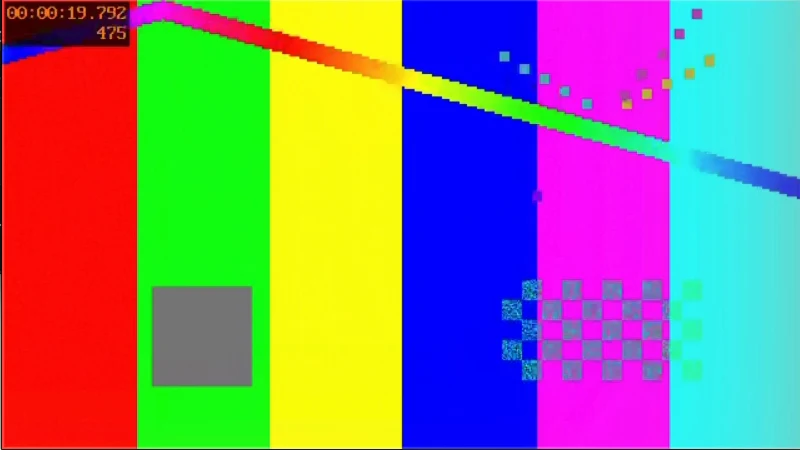
A page is drawn in tiles of 16 by 16 pixels. Before this release, tiles holding a 3D transform, a filter, a backdrop blur, a cone gradient or one of a few blend modes were drawn by the processor and the rest by the graphics card. Each of those now has a graphics card form that gives the same bytes as the software, proved by a test of 120 to 400 random cases each, run on an Apple GPU and an NVIDIA one.

Test pages, tiles the GPU decides97.9% -> 100%25 real sites, tiles the GPU decides0 pixels differ, 100% on every siteTime to draw the test setprocessor 250 ms, graphics card 167 ms

The browser checks its own graphics card

Graphics drivers have bugs, and a wrong pixel from one looks like a broken page. Because every graphics card drawing here is defined to equal the software drawing, the browser can check itself: every few seconds it draws one row of the page again in software, off the main thread, and compares. If they differ, the kinds of drawing in that row move to the processor for the rest of the session, the screen repaints, and the wrong row is never shown. Nothing leaves the device. The reference browser cannot do this: its graphics card drawing has no exact software twin to compare with.

Costone row every 2 seconds at mostSwitchFLOATI_NO_GPU_AUDIT

Fast to start on Windows

The new drawing code made the Windows graphics compiler take 14.7 seconds to prepare at start-up. Three changes brought it back: an exact multiply uses the card's own multiply instead of forty whole-number steps, loops are written so the compiler keeps one copy instead of unrolling them, and the new kinds of drawing are prepared on a thread of their own while the page is already showing. Until they are ready, those parts are drawn by the processor, exactly the same.

Windows start-up graphics preparation14.7 s -> 2.28 s (2.1 s before the new code)

Cone gradients that are the same everywhere

The angle in a cone-shaped gradient came from each operating system's own maths library, which can differ by a level between Mac, Windows and Linux. It now comes from our own angle function, built only from steps every machine does the same way, so the processor and the graphics card on every system give identical pixels. On our gradient test pages 4 pixels changed, each by one level.

Angle errorabout 0.00001 degreesSwitchFLOATI_NO_OWN_ATAN

바뀐 점

변경 26개
  1. 렌더링GPU: separable blend modes (multiply, screen, overlay and the rest) are drawn by the graphics card from tables the software fills itself. Switch: FLOATI_NO_GPU_BLEND.
  2. 렌더링GPU: diagonal linear gradients are drawn by the graphics card, with per-corner and elliptical corners. Switch: FLOATI_NO_GPU_LINEAR_SUM.
  3. 렌더링GPU: polygons are drawn by the graphics card from the software's own coverage. Switch: FLOATI_NO_GPU_POLYGON.
  4. 렌더링GPU: gradient-filled text (background-clip: text) is drawn by the graphics card, linear and radial. Switch: FLOATI_NO_GPU_TEXT_FILL.
  5. 렌더링GPU: linear and radial mask images are drawn by the graphics card. Switch: FLOATI_NO_GPU_MASK.
  6. 렌더링GPU: 3D rotations and skews are drawn by the graphics card in whole numbers. Switch: FLOATI_NO_GPU_PROJECT.
  7. 렌더링GPU: 3D perspective is drawn by the graphics card, every product and division rounded as the processor rounds it. Switch: FLOATI_NO_GPU_PROJECT_DEPTH.
  8. 렌더링GPU: 2D transforms are drawn by the graphics card. Switch: FLOATI_NO_GPU_AFFINE.
  9. 렌더링GPU: a layer can hold layers of its own (a blur inside a 3D card, a 3D card inside a fade), each drawn before the one that uses it.
  10. 렌더링GPU: opacity groups are drawn by the graphics card. Switch: FLOATI_NO_GPU_OPACITY.
  11. 웹 API와 DOMGPU: any chain of filters (blur, grayscale, saturate, brightness, contrast, invert, sepia, hue-rotate, opacity, drop shadow) is drawn by the graphics card. Switch: FLOATI_NO_GPU_BLUR.
  12. 렌더링GPU: backdrop blur (frosted glass) is drawn by the graphics card, also inside a clipped area like a fixed navigation bar. Switch: FLOATI_NO_GPU_BACKDROP.
  13. 렌더링GPU: cone-shaped (conic) gradients are drawn by the graphics card pixel by pixel. Switch: FLOATI_NO_GPU_CONIC.
  14. 탭과 인터페이스FIX: a conic gradient's angle comes from our own function, so Mac, Windows and Linux give the same pixels. Switch: FLOATI_NO_OWN_ATAN.
  15. 렌더링GPU: the hue, saturation, color and luminosity blend modes are drawn by the graphics card. Switch: FLOATI_NO_GPU_NONSEP.
  16. 렌더링GPU: clip-path polygons and clips with different corner radii are drawn by the graphics card. Switch: FLOATI_NO_GPU_CONTOUR_CLIP.
  17. 렌더링GPU: see-through hard-stop gradients (half-and-half dots and triangles) are drawn by the graphics card.
  18. 렌더링FIX: a layer that reached past its clip could paint outside it on the graphics card path.
  19. 렌더링GPU: a group starting a pixel past the page edge is no longer sent to the processor.
  20. 렌더링New: the graphics card drawing checks itself against software on the user's own device, and a difference moves that drawing to the processor. Switch: FLOATI_NO_GPU_AUDIT.
  21. 탭과 인터페이스Speed: Windows prepares the graphics card drawing in 2.28 s at start-up instead of 14.7 s, with the newest kinds prepared in the background. Switches: FLOATI_NO_GPU_SPLIT_PIPELINE, FLOATI_SOFT_MUL.
  22. 렌더링Speed: a property read seen on many kinds of object shares one cache across the page instead of searching each time. Switch: FLOATI_NO_MEGA_IC.
  23. 렌더링Speed: when a read changes the kind of object it sees, it no longer refills its cache at a cost, and method reads stay as fast as before. Switch: FLOATI_NO_KIND_SWITCH.
  24. JavaScript와 JITSpeed: objects record whether a proxy or a linked prototype can be on their chain, so most reads skip those searches. Switch: FLOATI_NO_LINK_FLAGS.
  25. JavaScript와 JITSpeed: objects with many properties keep their chain answers by prototype, and constants read from a prototype are cached. Switches: FLOATI_NO_DICT_CHAIN_IC, FLOATI_NO_PROTO_DATA_CACHE.
  26. 네트워크Testing: the Linux x86 check runs on a real Linux machine, 3,912 tests, and 25 real sites are measured for graphics card drawing with their network recorded. The release check passed on Mac, Windows and Linux with no page slower.

v0.1.409 이후 전부를 한곳에서

버전

v0.1.0 - 0.1.9 · 10 7월 2026418v0.1.427 · 25 11월 2026

11월2026 · 버전 19개

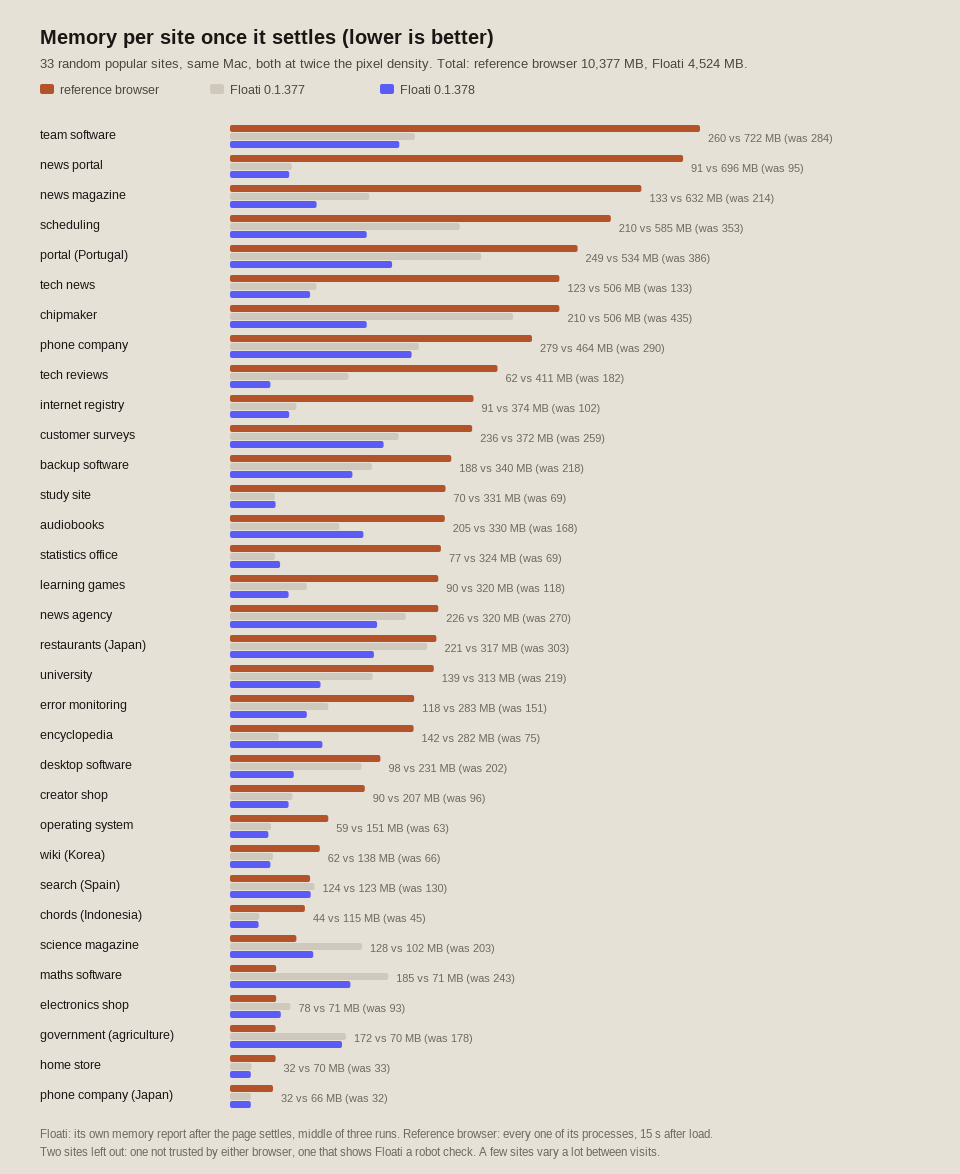
4088 11월3D at 120 frames a secondv0.1.408 · 렌더링23 4077 11월WebGL 2v0.1.407 · 렌더링36 4066 11월A stuck tab stops at oncev0.1.406 · 렌더링16 4055 11월Small WebGL drawings get smooth edgesv0.1.405 · 렌더링 4045 11월WebGL pages finally movev0.1.404 · 렌더링25 4035 11월WebGPU is herev0.1.403 · 렌더링35 4004 11월Smooth turns, the same bytes on every chip, and fields that keep their textv0.1.400 · 렌더링15 3994 11월Animations on the GPU compositor, and text that stays in its boxv0.1.399 · 렌더링22 3984 11월Gradient patterns that tile, animations that keep up, and a much faster canvasv0.1.398 · 렌더링14 3973 11월Transitions that ease, and a GPU that draws 94% of real pages itselfv0.1.397 · 렌더링 3963 11월Animations on the GPU compositor, and spinners that spin as arcsv0.1.396 · 렌더링 3953 11월Carousels that fade, badges that stay put, and floats that stay insidev0.1.395 · 렌더링12 3943 11월Background images over their colour, interlaced pictures, and borders in every colourv0.1.394 · 렌더링 3932 11월Style sheets in page order, and symbols that fall back like macOSv0.1.393 · 렌더링 3922 11월Icon fonts loaded by script, and colour emoji on Windowsv0.1.392 · 탭과 인터페이스 3911 11월Emoji in colour, sized as in the reference browserv0.1.391 · JavaScript와 JIT 3901 11월A classified ads site's front page: blank before, whole nowv0.1.390 · JavaScript와 JIT12 3891 11월A computer maker's home page: navigation labels back, buttons apartv0.1.389 · 렌더링 3881 11월A space agency's home page, a news section and a language site's header now match the referencev0.1.388 · 렌더링18

10월2026 · 버전 40개

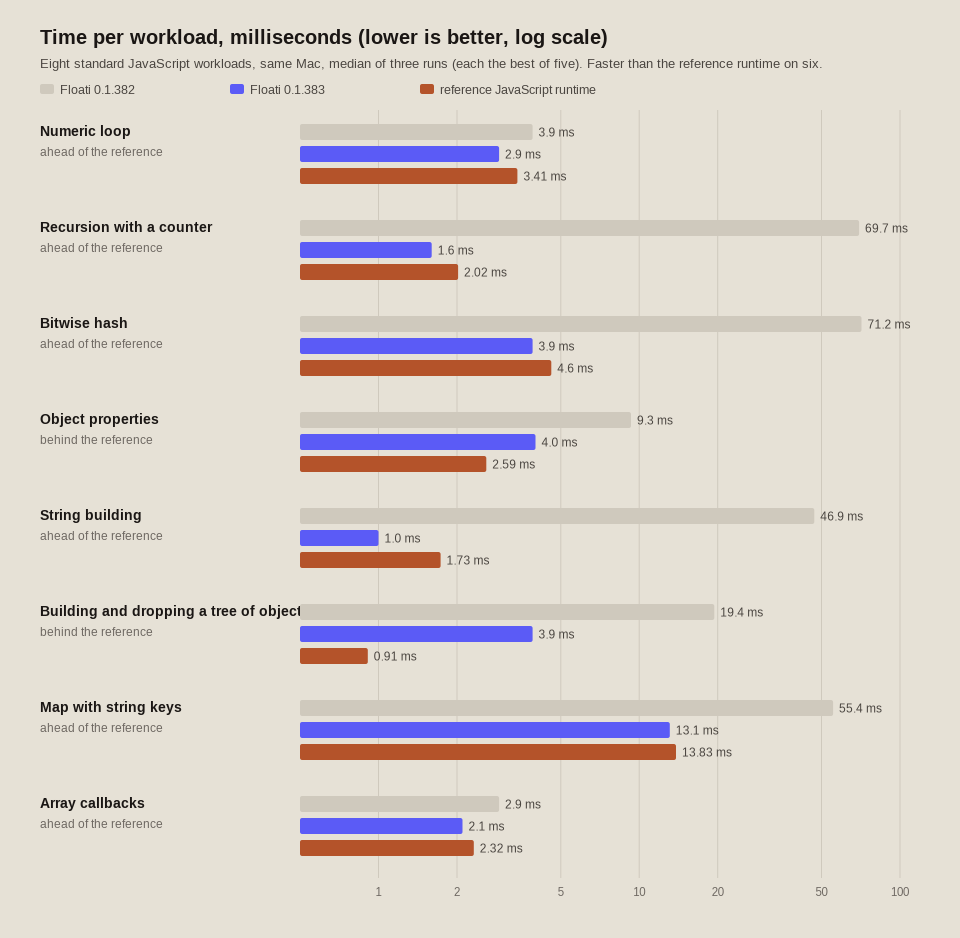
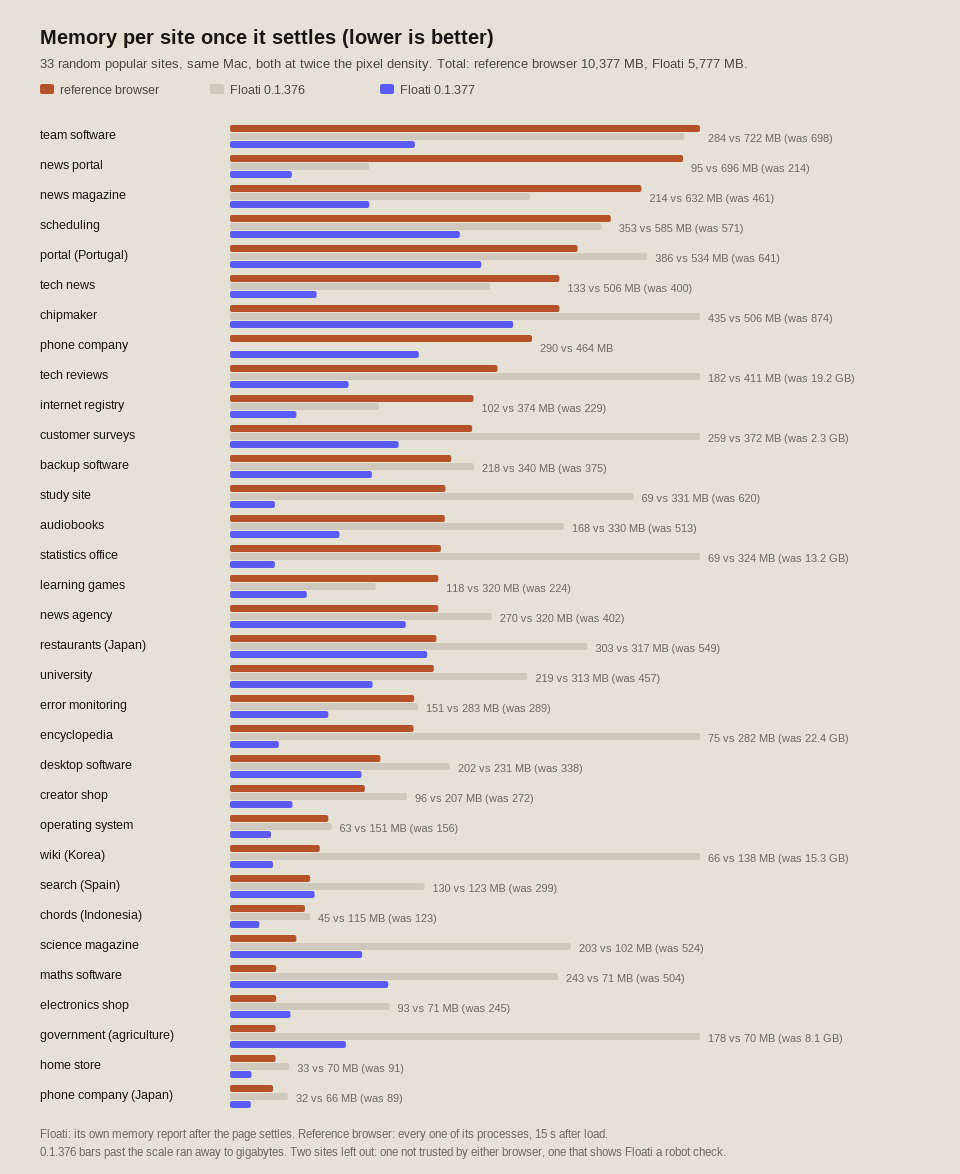
38731 10월News pages line up: a news site from 19.9% to 10.9% differentv0.1.387 · 렌더링 38631 10월Real sites render closer to the reference browserv0.1.386 · 렌더링14 38327 10월JavaScript ahead of the reference runtime on six of eight speed testsv0.1.383 · JavaScript와 JIT36 38025 10월Scrolling boxes scroll, pages look right, and scripts from other sites need permissionv0.1.380 · 렌더링16 37924 10월Pages laid out the way their authors wrote them, and less memory againv0.1.379 · 렌더링22 37823 10월Other sites' data stays private, and less memory againv0.1.378 · 기억과 읽기 37723 10월About half the memory of the reference browser on everyday sitesv0.1.377 · 기억과 읽기15 37622 10월A minimized window stops piling up graphics memoryv0.1.376 · 기억과 읽기 37522 10월Closed pages let go, sites stay apart, and fonts stop costing memoryv0.1.375 · 기억과 읽기9 37421 10월A floating video you can move, that opens without a black flashv0.1.374 · 탭과 인터페이스 37321 10월Every page on our own engine, two pages side by side, videos that keep playing, and your own clockv0.1.373 · 탭과 인터페이스17 37221 10월Your data stays put, your choices stick, and dictation that really listensv0.1.372 · 렌더링 37121 10월Drop files onto pages, dictate without your voice leaving the Mac, and controllers that rumblev0.1.371 · 웹 API와 DOM · 확인해 보기 37021 10월Open your files, share to your phone, have pages read aloud, install sites as apps, play with a controller, and accented text drawn rightv0.1.370 · 개인정보 보호와 Shields · 확인해 보기11 36920 10월Passkeys with Touch ID and Windows Hello, sites that work offline, notifications you allow, and devices asked for first, all kept on your devicev0.1.369 · 개인정보 보호와 Shields · 확인해 보기9 36820 10월A site's own security rules are kept the whole time the page runs, Trusted Types, a map of every unsafe write in DevTools, and animations from scriptv0.1.368 · 개인정보 보호와 Shields · 확인해 보기 36720 10월Events, form controls, performance timing, URL patterns, live streams and the newest JavaScript: the Web APIs score rises from 59 to 62v0.1.367 · 웹 API와 DOM · 확인해 보기10 36619 10월Events, custom form controls, fonts and navigation work the way the web standards say: the Web APIs score rises from 53 to 59v0.1.366 · 웹 API와 DOM · 확인해 보기9 36519 10월The code-size budget fits your processor, and code that has gone cold makes room for code that is hot nowv0.1.365 · JavaScript와 JIT · 확인해 보기 36419 10월Compiled code that fits the processor's caches: big pages up to 1.8 times faster, and fast compiled code on Windows and Intel machinesv0.1.364 · JavaScript와 JIT · 확인해 보기 36319 10월Thermal runs on one code generator, building strings is up to 8 times faster, and two slow paths that grew with the square of their input are linearv0.1.363 · JavaScript와 JIT · 확인해 보기12 36219 10월A page scheduler that stalled now runs, try / finally and spreads compile, and deleting thousands of properties is 180 times fasterv0.1.362 · 렌더링 · 확인해 보기 36118 10월Thermal runs on Windows and Intel machines, a register fix for compiled code on Windows, try / catch compiles, and reading a growing string is 200 times fasterv0.1.361 · JavaScript와 JIT · 확인해 보기 36018 10월Every byte of machine code is Floati's own, a news site that showed blank renders, Gust's code is half the size, and closures and ?? compilev0.1.360 · JavaScript와 JIT · 확인해 보기9 35916 10월Thermal reads object members and folds Math, string building compiles, and methods, Array subclasses and globals behave as the standard saysv0.1.359 · JavaScript와 JIT · 확인해 보기 35816 10월Thermal, Floati's own optimizing compiler, is on: hot loops keep their numbers and strings in registersv0.1.358 · JavaScript와 JIT · 확인해 보기 35715 10월Loops that test a number run as machine code, more of your functions compile, and reading page nodes is three times fasterv0.1.357 · JavaScript와 JIT · 확인해 보기14 35614 10월Recursion makes a fraction of the calls, loops keep objects in registers, and element writes stop searchingv0.1.356 · JavaScript와 JIT · 확인해 보기 35514 10월A hot loop changes compiler without stopping, property writes skip the detour, and pure recursion remembers its answersv0.1.355 · JavaScript와 JIT · 확인해 보기 34910 10월Scripts that grow in step with their work, layouts laid out once, and colours mixed like the referencev0.1.349 · 렌더링 · 확인해 보기13 3489 10월Scripts that only compile when it pays, cards that line up, and bold that stays boldv0.1.348 · 렌더링 · 확인해 보기14 3478 10월Cards inside links, small print at its real size, and errors you can followv0.1.347 · 렌더링 · 확인해 보기17 3467 10월A real performance timeline, site icons from the engine with a lookalike check, and forms that lay out rightv0.1.346 · 렌더링 · 확인해 보기14 3457 10월Real WebGL, a real 2D canvas, and canvas text that matches the reference browserv0.1.345 · 렌더링 · 확인해 보기10 3446 10월Retina text that keeps its spacing, embeds at their real size, and an address bar that keeps upv0.1.344 · 렌더링 3436 10월Sign-ins that stay signed in, a real IndexedDB, and a storage button that shows what sites keepv0.1.343 · 개인정보 보호와 Shields · 확인해 보기25 3425 10월Theme switchers, chart labels sized by CSS, and SVG text you can measurev0.1.342 · 웹 API와 DOM · 확인해 보기 3415 10월Canvas text measured and drawn like the reference browser, and SVG shapes you can measurev0.1.341 · 렌더링 · 확인해 보기 3405 10월Scripts can read and change SVG the way they do in the reference browser, and a hidden hang is gonev0.1.340 · 렌더링 · 확인해 보기10 3385 10월Pages load faster, render truer and gain a dozen modern web features, each one checked against the reference browserv0.1.338 · 웹 API와 DOM · 확인해 보기19