모든 버전 v0.1.4098 11월 2026렌더링, JavaScript와 JIT, 웹 API와 DOM, 네트워크, 탭과 인터페이스 피드

릴리스 노트는 영어로 작성되어 있습니다.

Every tile on the GPU

The graphics card now draws every part of every page we test, and every pixel it draws is the same as the software drawing it replaces. On the 98 pages of our test set and on 25 real sites, from news front pages to web apps, nothing is left for the processor to draw. That took 3D and perspective, filters and blurs behind glass, cone-shaped gradients, masks, the four colour blend modes and shaped clips, each proved pixel for pixel on Mac and on Windows. The browser also checks its own graphics card now: a driver that gets something wrong is caught on the user's own machine and that drawing moves back to the processor.

97.9% -> 100%Test pages, tiles the GPU decides
one row every 2 seconds at mostCost
14.7 s -> 2.28 s (2.1 s before the new code)Windows start-up graphics preparation
주요 내용4

Every tile, both test sets

A page is drawn in tiles of 16 by 16 pixels. Before this release, tiles holding a 3D transform, a filter, a backdrop blur, a cone gradient or one of a few blend modes were drawn by the processor and the rest by the graphics card. Each of those now has a graphics card form that gives the same bytes as the software, proved by a test of 120 to 400 random cases each, run on an Apple GPU and an NVIDIA one.

Test pages, tiles the GPU decides97.9% -> 100%25 real sites, tiles the GPU decides0 pixels differ, 100% on every siteTime to draw the test setprocessor 250 ms, graphics card 167 ms

The browser checks its own graphics card

Graphics drivers have bugs, and a wrong pixel from one looks like a broken page. Because every graphics card drawing here is defined to equal the software drawing, the browser can check itself: every few seconds it draws one row of the page again in software, off the main thread, and compares. If they differ, the kinds of drawing in that row move to the processor for the rest of the session, the screen repaints, and the wrong row is never shown. Nothing leaves the device. The reference browser cannot do this: its graphics card drawing has no exact software twin to compare with.

Costone row every 2 seconds at mostSwitchFLOATI_NO_GPU_AUDIT

Fast to start on Windows

The new drawing code made the Windows graphics compiler take 14.7 seconds to prepare at start-up. Three changes brought it back: an exact multiply uses the card's own multiply instead of forty whole-number steps, loops are written so the compiler keeps one copy instead of unrolling them, and the new kinds of drawing are prepared on a thread of their own while the page is already showing. Until they are ready, those parts are drawn by the processor, exactly the same.

Windows start-up graphics preparation14.7 s -> 2.28 s (2.1 s before the new code)

Cone gradients that are the same everywhere

The angle in a cone-shaped gradient came from each operating system's own maths library, which can differ by a level between Mac, Windows and Linux. It now comes from our own angle function, built only from steps every machine does the same way, so the processor and the graphics card on every system give identical pixels. On our gradient test pages 4 pixels changed, each by one level.

Angle errorabout 0.00001 degreesSwitchFLOATI_NO_OWN_ATAN

바뀐 점

변경 26개
  1. 렌더링GPU: separable blend modes (multiply, screen, overlay and the rest) are drawn by the graphics card from tables the software fills itself. Switch: FLOATI_NO_GPU_BLEND.
  2. 렌더링GPU: diagonal linear gradients are drawn by the graphics card, with per-corner and elliptical corners. Switch: FLOATI_NO_GPU_LINEAR_SUM.
  3. 렌더링GPU: polygons are drawn by the graphics card from the software's own coverage. Switch: FLOATI_NO_GPU_POLYGON.
  4. 렌더링GPU: gradient-filled text (background-clip: text) is drawn by the graphics card, linear and radial. Switch: FLOATI_NO_GPU_TEXT_FILL.
  5. 렌더링GPU: linear and radial mask images are drawn by the graphics card. Switch: FLOATI_NO_GPU_MASK.
  6. 렌더링GPU: 3D rotations and skews are drawn by the graphics card in whole numbers. Switch: FLOATI_NO_GPU_PROJECT.
  7. 렌더링GPU: 3D perspective is drawn by the graphics card, every product and division rounded as the processor rounds it. Switch: FLOATI_NO_GPU_PROJECT_DEPTH.
  8. 렌더링GPU: 2D transforms are drawn by the graphics card. Switch: FLOATI_NO_GPU_AFFINE.
  9. 렌더링GPU: a layer can hold layers of its own (a blur inside a 3D card, a 3D card inside a fade), each drawn before the one that uses it.
  10. 렌더링GPU: opacity groups are drawn by the graphics card. Switch: FLOATI_NO_GPU_OPACITY.
  11. 웹 API와 DOMGPU: any chain of filters (blur, grayscale, saturate, brightness, contrast, invert, sepia, hue-rotate, opacity, drop shadow) is drawn by the graphics card. Switch: FLOATI_NO_GPU_BLUR.
  12. 렌더링GPU: backdrop blur (frosted glass) is drawn by the graphics card, also inside a clipped area like a fixed navigation bar. Switch: FLOATI_NO_GPU_BACKDROP.
  13. 렌더링GPU: cone-shaped (conic) gradients are drawn by the graphics card pixel by pixel. Switch: FLOATI_NO_GPU_CONIC.
  14. 탭과 인터페이스FIX: a conic gradient's angle comes from our own function, so Mac, Windows and Linux give the same pixels. Switch: FLOATI_NO_OWN_ATAN.
  15. 렌더링GPU: the hue, saturation, color and luminosity blend modes are drawn by the graphics card. Switch: FLOATI_NO_GPU_NONSEP.
  16. 렌더링GPU: clip-path polygons and clips with different corner radii are drawn by the graphics card. Switch: FLOATI_NO_GPU_CONTOUR_CLIP.
  17. 렌더링GPU: see-through hard-stop gradients (half-and-half dots and triangles) are drawn by the graphics card.
  18. 렌더링FIX: a layer that reached past its clip could paint outside it on the graphics card path.
  19. 렌더링GPU: a group starting a pixel past the page edge is no longer sent to the processor.
  20. 렌더링New: the graphics card drawing checks itself against software on the user's own device, and a difference moves that drawing to the processor. Switch: FLOATI_NO_GPU_AUDIT.
  21. 탭과 인터페이스Speed: Windows prepares the graphics card drawing in 2.28 s at start-up instead of 14.7 s, with the newest kinds prepared in the background. Switches: FLOATI_NO_GPU_SPLIT_PIPELINE, FLOATI_SOFT_MUL.
  22. 렌더링Speed: a property read seen on many kinds of object shares one cache across the page instead of searching each time. Switch: FLOATI_NO_MEGA_IC.
  23. 렌더링Speed: when a read changes the kind of object it sees, it no longer refills its cache at a cost, and method reads stay as fast as before. Switch: FLOATI_NO_KIND_SWITCH.
  24. JavaScript와 JITSpeed: objects record whether a proxy or a linked prototype can be on their chain, so most reads skip those searches. Switch: FLOATI_NO_LINK_FLAGS.
  25. JavaScript와 JITSpeed: objects with many properties keep their chain answers by prototype, and constants read from a prototype are cached. Switches: FLOATI_NO_DICT_CHAIN_IC, FLOATI_NO_PROTO_DATA_CACHE.
  26. 네트워크Testing: the Linux x86 check runs on a real Linux machine, 3,912 tests, and 25 real sites are measured for graphics card drawing with their network recorded. The release check passed on Mac, Windows and Linux with no page slower.

v0.1.409 이후 전부를 한곳에서

버전

v0.1.0 - 0.1.9 · 10 7월 2026418v0.1.427 · 25 11월 2026

11월2026 · 버전 13개

10월2026 · 버전 22개

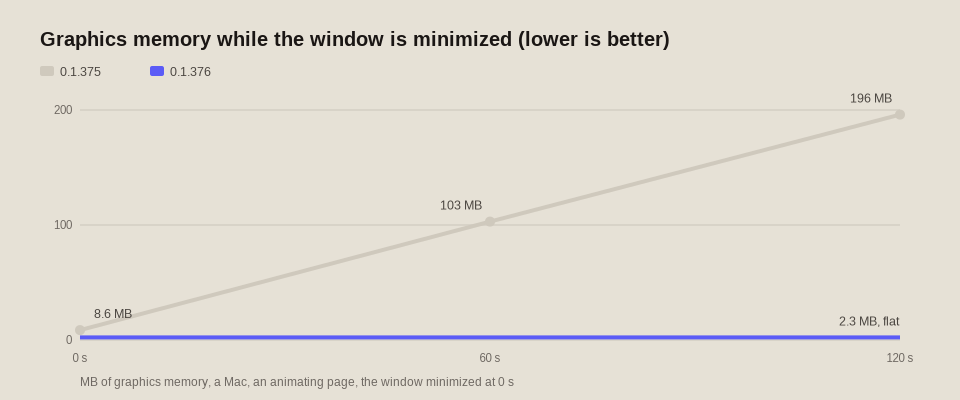
38631 10월Real sites render closer to the reference browserv0.1.386 · 렌더링14 38429 10월Safety review, a rare crash fixed, functions compiled soonerv0.1.384 · 기억과 읽기46 38025 10월Scrolling boxes scroll, pages look right, and scripts from other sites need permissionv0.1.380 · 렌더링16 37622 10월A minimized window stops piling up graphics memoryv0.1.376 · 기억과 읽기 37421 10월A floating video you can move, that opens without a black flashv0.1.374 · 탭과 인터페이스 37321 10월Every page on our own engine, two pages side by side, videos that keep playing, and your own clockv0.1.373 · 탭과 인터페이스17 37121 10월Drop files onto pages, dictate without your voice leaving the Mac, and controllers that rumblev0.1.371 · 웹 API와 DOM · 확인해 보기 37021 10월Open your files, share to your phone, have pages read aloud, install sites as apps, play with a controller, and accented text drawn rightv0.1.370 · 개인정보 보호와 Shields · 확인해 보기11 36820 10월A site's own security rules are kept the whole time the page runs, Trusted Types, a map of every unsafe write in DevTools, and animations from scriptv0.1.368 · 개인정보 보호와 Shields · 확인해 보기 36519 10월The code-size budget fits your processor, and code that has gone cold makes room for code that is hot nowv0.1.365 · JavaScript와 JIT · 확인해 보기 36018 10월Every byte of machine code is Floati's own, a news site that showed blank renders, Gust's code is half the size, and closures and ?? compilev0.1.360 · JavaScript와 JIT · 확인해 보기9 35916 10월Thermal reads object members and folds Math, string building compiles, and methods, Array subclasses and globals behave as the standard saysv0.1.359 · JavaScript와 JIT · 확인해 보기 35614 10월Recursion makes a fraction of the calls, loops keep objects in registers, and element writes stop searchingv0.1.356 · JavaScript와 JIT · 확인해 보기 3478 10월Cards inside links, small print at its real size, and errors you can followv0.1.347 · 렌더링 · 확인해 보기17 3467 10월A real performance timeline, site icons from the engine with a lookalike check, and forms that lay out rightv0.1.346 · 렌더링 · 확인해 보기14 3446 10월Retina text that keeps its spacing, embeds at their real size, and an address bar that keeps upv0.1.344 · 렌더링 3436 10월Sign-ins that stay signed in, a real IndexedDB, and a storage button that shows what sites keepv0.1.343 · 개인정보 보호와 Shields · 확인해 보기25 3385 10월Pages load faster, render truer and gain a dozen modern web features, each one checked against the reference browserv0.1.338 · 웹 API와 DOM · 확인해 보기19 3362 10월Site controls that do what they say: permissions that really ask, and Shields per sitev0.1.336 · 개인정보 보호와 Shields13 3352 10월A developer-docs site works like the reference browser, and every frame gets its own built-insv0.1.335 · 렌더링12 3342 10월Iframes that cost what a paragraph costs, live selections, and rounder cornersv0.1.334 · 렌더링10 3321 10월Pinned tabs on the left or the right, and an honest measure of the web platformv0.1.332 · 탭과 인터페이스9

9월2026 · 버전 46개

32227 9월Closed pages give their memory back whole, and JavaScript measured at 87v0.1.322 · JavaScript와 JIT11 32127 9월Half the memory, and JavaScript measured at 80v0.1.321 · JavaScript와 JIT14 31926 9월A PDF viewer that does what Acrobat Pro charges forv0.1.319 · 탭과 인터페이스16 31825 9월Floati engine pages work with screen readersv0.1.318 · 접근성9 31725 9월Closer to the reference browser, and no more address bar tricksv0.1.317 · 웹 API와 DOM 31325 9월A large encyclopedia and a news site now sit where the reference browser puts themv0.1.313 · JavaScript와 JIT 31225 9월The window is finally just the windowv0.1.312 · 탭과 인터페이스 31125 9월Text now lines up with the reference browser's to a fraction of a percentv0.1.311 · 렌더링 31025 9월Pages stay alive, repaints never block your scroll, and type matches the reference browser'sv0.1.310 · 렌더링10 30924 9월Pages arrive like they do in the reference browser, in a fraction of the memoryv0.1.309 · 네트워크13 30824 9월Pages drawn by your graphics card, and scrolling that never waitsv0.1.308 · 렌더링 30724 9월Long videos play all the way through on Windows toov0.1.307 · 미디어 30624 9월Video that plays the whole way through, smoothlyv0.1.306 · 미디어 29817 9월More number-crunching loops run several values at once, now on Windows and Intel Macs too, and faster than the reference browserv0.1.298 · JavaScript와 JIT 29516 9월Class-based JavaScript runs dramatically faster: calling a method through a list of objects is now many times quickerv0.1.295 · JavaScript와 JIT 29416 9월Integer, bitwise and pixel-processing JavaScript runs a lot faster, and the browser still proves every shortcut before it trusts itv0.1.294 · JavaScript와 JIT 29316 9월Class-based and object-heavy JavaScript runs dramatically faster, with speed the browser proves before it trustsv0.1.293 · JavaScript와 JIT 29116 9월A private wayback machine for pages you seal, cited answers that open where you read them, and a privacy report that is ready the instant a page loadsv0.1.291 · 기억과 읽기 28815 9월The pages where you type a password stay out of your memory, and text renders truer to the pagev0.1.288 · 기억과 읽기 28711 9월A downloads manager that looks out for you, and scan-free QR that reads any code on a pagev0.1.287 · 탭과 인터페이스 28611 9월Open a QR code's link without a phone, and pages that reveal themselves on load now show upv0.1.286 · 렌더링 28511 9월Sites built with today's popular styling tools now render the way they shouldv0.1.285 · 탭과 인터페이스 28411 9월Pop-out menus size to their contents, and pages get complete answers about their own stylingv0.1.284 · 렌더링 28311 9월Messages between windows now prove who sent themv0.1.283 · 렌더링 28011 9월An honest block count, and font fingerprinting defeatedv0.1.280 · 개인정보 보호와 Shields 27811 9월A tracker can no longer follow you from one site to the nextv0.1.278 · 렌더링 2579 9월Table-style and flex layouts, sized like the reference browser on real sitesv0.1.257 · 렌더링 2569 9월Grid front pages that fit: multi-column layouts sized like the reference browserv0.1.256 · 탭과 인터페이스 2528 9월SVG graphics: patterns, full gradients, and text that lines upv0.1.252 · 렌더링 2508 9월Grid layouts and responsive pages, tuned to the reference browserv0.1.250 · 탭과 인터페이스 2498 9월Rendering fidelity: three more real-web fixesv0.1.249 · 렌더링 2468 9월Memory: your browser remembers what you read, and can prove itv0.1.246 · 기억과 읽기 2396 9월Row subgrid, and a little bird in the update cardv0.1.239 · 탭과 인터페이스 2386 9월Updates arrive faster, with a check the moment you openv0.1.238 · 탭과 인터페이스 2376 9월Sticky pinning now works on retina and high-resolution screensv0.1.237 · 탭과 인터페이스 2366 9월Sticky headers and nav bars pin while you scrollv0.1.236 · 탭과 인터페이스 2356 9월Complex page grids and classic tables lay out like the reference browserv0.1.235 · 렌더링 2255 9월Real right-to-left pages, and grids that size to their contentv0.1.225 · 렌더링 2235 9월Tables, container units, card grids, and vertical stacks lay out rightv0.1.223 · 렌더링 2183 9월A calmer launch and a tidier browserv0.1.218 · 탭과 인터페이스 2173 9월Your passwords, the Floati wayv0.1.217 · 탭과 인터페이스 2163 9월The update button, fixed upv0.1.216 · 탭과 인터페이스 2153 9월A cleaner, more familiar tab strip and tab groupsv0.1.215 · 탭과 인터페이스 2143 9월Updates that put you back exactly where you left off, and tab groups that finally behavev0.1.214 · 탭과 인터페이스 2132 9월Floati's own engine now draws your pages by default on Macv0.1.213 · 탭과 인터페이스 2071 9월Info cards float over the page now, instead of hiding itv0.1.207 · 탭과 인터페이스

8월2026 · 버전 36개

20528 8월When a page won’t load, the browser tells you instead of going blankv0.1.205 · 탭과 인터페이스 20428 8월Engine-rendered pages line up with other browsers more preciselyv0.1.204 · 렌더링 20027 8월Info panels stay in their box, menus show real labelsv0.1.200 · JavaScript와 JIT 19726 8월Tightly-fitted text stops breaking a word earlyv0.1.197 · 렌더링 19421 8월Faster on pages that change as you use them - plus a tab-hover fixv0.1.194 · 탭과 인터페이스 19321 8월Select text, find on the page, and zoom - plus faster renderingv0.1.193 · 탭과 인터페이스 19019 8월Centred icons, missing menu icons, and a grey smudge - all fixedv0.1.190 · 탭과 인터페이스 18919 8월The encyclopedia's appearance controls and side menus work againv0.1.189 · 탭과 인터페이스 18619 8월Engine tabs remember where you werev0.1.186 · 탭과 인터페이스 18418 8월Articles with a sidebar box now flow around it, the way they shouldv0.1.184 · 개인정보 보호와 Shields 17818 8월The window reopens at the size you left itv0.1.178 · 탭과 인터페이스 17016 8월Render Receipts: seal a page into proof the reference browser structurally cannot offerv0.1.170 · 웹 API와 DOM 15015 8월The GPU rasterises the page's boxes, not just composites themv0.1.150 · 탭과 인터페이스 13614 8월WebGL: the engine now runs shaders and draws trianglesv0.1.136 · 렌더링 13213 8월The GPU compositor can present directly to a window, no readbackv0.1.132 · 탭과 인터페이스 12213 8월Time-travel scrubbing: jump to any pause on the timelinev0.1.122 · DevTools 12113 8월Time-travel debugging: step BACK - a debugger the reference browser does not havev0.1.121 · 탭과 인터페이스 11913 8월DevTools: a Sources panel with a clickable line gutterv0.1.119 · 탭과 인터페이스 11811 8월DevTools debugger: step over, into and outv0.1.118 · JavaScript와 JIT 1177 8월DevTools breakpoints snap to the nearest real linev0.1.117 · DevTools 1167 8월DevTools debugger: source-line breakpointsv0.1.116 · DevTools 1157 8월DevTools debugger: evaluate expressions at the breakpointv0.1.115 · DevTools 1147 8월DevTools debugger: pause on exceptionsv0.1.114 · DevTools 1137 8월Visual DevTools: a live Console REPL and a Debugger panelv0.1.113 · 탭과 인터페이스 996 8월A real accessibility treev0.1.99 · 접근성 976 8월Real captionsv0.1.97 · 렌더링 906 8월The version number in the app is honest againv0.1.90 · 탭과 인터페이스 845 8월A fixed-width box is now sized like one, and a code-hosting site gets its sidebar backv0.1.84 · 렌더링 835 8월Four layout fixes chasing one header down to the pixelv0.1.83 · 렌더링 825 8월Five layout defects, found by asking a real page where every box isv0.1.82 · 렌더링 805 8월The page can ask what is under a pointv0.1.80 · 웹 API와 DOM 704 8월One press, and you are on the new versionv0.1.70 · 탭과 인터페이스 694 8월The colour of an icon, and a dozen ways the web fills in a blankv0.1.69 · 렌더링 682 8월One grey rectangle on a code-hosting site was four separate bugsv0.1.68 · 렌더링 672 8월We stopped grading the engine on pages and started grading it on CSSv0.1.67 · 렌더링 661 8월The worst score on the board turned out to be a cookie bannerv0.1.66 · 렌더링9

7월2026 · 버전 19개

6531 7월We started grading the engine on real websites, and five things broke immediatelyv0.1.65 · 렌더링 6431 7월An ad and tracker blocker built into the engine, not bolted onto itv0.1.64 · 개인정보 보호와 Shields 6230 7월Scripts get much faster, and two of the speed-ups turned out to be switched offv0.1.62 · JavaScript와 JIT13 6130 7월Twenty rendering fixes found by scoring every test page against the reference browserv0.1.61 · 렌더링20 5023 7월You can see when Floati is drawing the page itselfv0.1.50 · JavaScript와 JIT 4923 7월Sites you click start responding, and the web lays out like the reference browserv0.1.49 · 렌더링15 4822 7월Text breathes like the reference browser, and the old web settles into placev0.1.48 · 렌더링9 4722 7월Cards, columns and grids stop landing on top of each otherv0.1.47 · 렌더링 4622 7월Pages sit where they should on the screenv0.1.46 · 렌더링 4522 7월The websites that used to come out broken now come out rightv0.1.45 · 렌더링10 3921 7월Second windows work, and loops with real helpers get compiledv0.1.39 · 탭과 인터페이스 2719 7월Pages that lay out the way they shouldv0.1.27 · 렌더링 1717 7월Engine pages become real tabsv0.1.17 · 탭과 인터페이스 1415 7월Video plays on our own enginev0.1.14 · 미디어 1315 7월Tabs that know each otherv0.1.13 · 탭과 인터페이스 1214 7월The engine starts taking overv0.1.12 · 렌더링 1112 7월Pick your engine per sitev0.1.11 · 렌더링 1012 7월Your browsing, remembered locallyv0.1.10 · 기억과 읽기 0-910 7월First public releasesv0.1.0 - 0.1.9 · 기억과 읽기